Monday, 10 June 2013

More D's for Grasshopper BIM

Recently I've been working on enabling more dimensions to Grasshopper BIM, primarily Planning and Costing.  I've just posted an installer (http://www.geometrygym.com/downloads ) that's capable of generating the attached program example (which is just like a Gantt chart just in Grasshopper format).


Grasshopper 0.9.0056 Definition Grasshopper 0.9.0014 Definition IFC4 created
This example creates a residential project construction program.  It demonstrates nesting tasks inside others, nominated precedence dependency (including lag time and start-finish or start-start type relationships) and nominating task duration.  It's also possible to assign task to work calendars defining working times  or exceptions (such as holidays or rostered days off).

At the moment there's not components to provide feedback such as collated/aggregated scheduled finish time etc, but this is certainly something I'll pursue.  Of a higher importance is probably to develop an importer for existing management software such as Microsoft Project (or other suggestions made by users) so that gantt charts (in a more typical/recognizable format) and reports can be generated there.

I've also started work on costing and resourcing metrics which I'll be posting soon.  I think what would also be impressive/useful with this is assigning products to tasks and creating a virtual build construction sequence within Grasshopper (or other software).

And remember this is all being managed within the IFC OpenBIM framework, so if you already use software capable of importing the model data, it's a really powerful opportunity.  At present I'm only generating IFC4 models as there are significant improvements in this area (but also means significant differences from IFC2x3) but if existing software only using IFC2x3 can be used I'll look at enabling "equivalent" IFC2x3 where possible.

Look forward to hearing suggestions and requests.

Thursday, 23 May 2013

OpenBIM Scripting : Python IFC

Goswin posted to the Grasshopper forum a week or so ago about the possibility of scripting IFC data from Python (Rhino Python to be exact).  I hadn't had much of a chance to try Python to date, but I've tested GH Python today (Rhino python should work just the same).


You can download the sample GH def here.

Note there is also the possibility of using my c# libraries (from C#, VB.Net, Python or other compatible languages) outside of the Rhino/GH environment.  Get in touch if you would like to learn more.  Also not everything is enabled, but I can quickly do so.  Grasshopper is really a graphical programming language, so what is available there is certainly easy to provide in the API.

Wednesday, 27 February 2013

The End of Babel

We had two very successful OpenBIM evenings in Melbourne last week, at SIAL (RMIT) and Arup.  The first was recorded (although I'm going to re-record mine) and hopefully we can post soon.

Matt Rumbelow of Revitall did a fantastic job of handling most of the organization, and it was great to see him show this video to promote and explain IFC (from nearly 20 years ago). Many thanks to Stephen Hamil for posting this for us all to access.


It was great to meet Dr Thomas Liebich in person (after quite a few emails).  One of the improvements in IFC4 that I wasn't aware of (or had implemented) prior to his presentation was a new tessellated shape representation optimized with objective of smaller file sizes.  This is particularly useful given how many IFC files are generated with this primitive (useful enough for coordination or visualization) shape representation leading to bloated file sizes.

I've now implemented it, and here is a comparison.
This mesh sphere (with 4900 faces) is generated in IFC2x3 (file) and IFC4 (file).  IFC2x3 generated a file of 750kB and IFC4 214kB, an improvement of around 70%.  When amplified over many objects (acknowledging real files contain other data influencing overall size improvement) this will still have a significant effect.  If you want to test the generation of these models, the gh def is here.  Note you right click on the ssiBake component to toggle IFC2x3 or IFC4.

Tuesday, 29 January 2013

Melbourne OpenBIM Event

SIAL (Spatial information Architecture Laboratory) at RMIT University in Melbourne have been very generous to host an OpenBIM event on the evening of Monday the 18th February.  

It's a great privilege to announce that Dr Thomas Liebich is also in Melbourne at this time.  Thomas is the leader of the IFC Development team for Building Smart International based in Germany, and also a director of AEC3.

Thomas will present on the IFC standard (past, current and future) including the imminent release of IFC4 as an ISO standard.

I will also present on OpenBIM workflows and the research/development I've done in the past 3 years.  This will include insights into project application of generative BIM workflows from Grasshopper to Revit and Tekla.  I will also be discussing why current IFC implementations by BIM software vendors have only utilized IFC to a fraction of it's capability and potential.   I will also demonstrate benefits design teams can realize from collaboration of model sharing using IFC including Fabrication, Analysis and Design ( Structural, Energy, Egress, Building Regulation compliance), Facility Management etc.

Please rsvp if you'd like to attend to jonm@geometrygym.com or contact me for more details.  We plan to start presentations at 6pm, but will be there from 5:30pm at the multi-purpose room of the Design Hub (Level 1).
Design Hub
RMIT University
150 Victoria Street (Corner of Swanston & Victoria Street)
Melbourne VIC 3001


Note there will be a second event hosted at Arup on the Wednesday evening.  More details to be posted shortly.


Friday, 18 January 2013

IFC - What It Is and Why You Should Care?

IFC - What It Is and Why You Should Care?

Christopher Zoog of HOK presented this great explanation to the New York City Revit User Group earlier this week.  HOK are certainly pushing and pursuing IFC in a number of impressive ways into their workflows, including pressure on software providers (such as myself).  They are not alone, but this provides some great insights into what is possible and what will be.


Thanks to Ryan Shultz for recording and enabling sharing.

Thursday, 27 September 2012

Grasshopper to Vasari

Thanks to Lilli Smith (and her Autodesk Colleagues) for arranging a very interesting Vasari Webinar discussing some of the different developments to link Grasshopper to Vasari.

The panelists were myself demonstrating the OpenBIM approach using IFC4, Hiroshi Jacobs presenting Chameleon, Tim Meador demonstrating HummingBird and Nathan Miller showing his OpenNurbs importer.

If you missed it, you can watch it here:
Or the individual playlists are here.

I'm sure this is the start of the discussions, so keep an eye on the Vasari and Grasshopper forums.


Tuesday, 18 September 2012

IFC Importer for VASARI

Vasari Beta1 was released a couple of weeks ago, and last week the SDK that I set about adjusting my Revit IFC importing code for.

I've just uploaded the first public installer, http://www.geometrygym.com/downloads

Here's an example model to start testing.
Grasshopper Definition   IFC File

You can nominate site longitude and latitude and also building storey levels.  Conceptual masses can also be nominated, this example uses a loft/sectioned spine.

There's lots more improvements and features to add, let me know what you'd like to see and I'll try to prioritize it.


Saturday, 11 August 2012

GH to Archicad (OpenBIM IFC)

With the new release of Archicad v16, it permits me the opportunity to download and test improvements made to IFC support.  This is still in progress, and initially I was a little disappointed, but revisiting a single test case for Constructive Solid Geometry (CSG) or Solid Element Operation as it might be known to Archicad users leads me to confidence and optimism about IFC exchange with Archicad.

So here's the test case that has me excited.  I posted nearly 2 years ago about most software reverting to "coordination" IFC models, primarily faceted breps (meshed surfaces).  Possibly this is acceptable for visualization and clash detection (but not efficiently) but if you want smart models that can be enhanced and edited down stream, IFC is derived from STEP and capable of many advanced and accurate shape representations.  This is also explained in my Technical Paper from last year.

So in two years I've still had no success in other software understanding the CSG steps that can define a gothic arch roof, until now.  I was thrilled to see Archicad v16 import this accurately, which might enable some really exciting project work flows from Grasshopper.  Perspective view doesn't seem to render anything, but isometric does (maybe someone can explain why).


Here's the IFC file if you want to test yourself, and here's the Grasshopper Definition.

The first test I ran also worked quite well.  Archicad doesn't have nurbs (at least yet), so I converted the nurbs curves for the Klein Building slabs into polycurves.  IFC file, Grasshopper Def


Now for some tests with scope for improvement. I tried to import an IFC file with swept beams.  It was pleasing to see the straight beam generate accurate edit handles, but none of the curved beams worked.  IFC4 does not appear to developed, so useful improvements such as cardinal points are not accessible.  IFC file, Grasshopper Def


And the final test for the time being, the waffle structure.  Slabs come in fine, seems to be an orientation issue for the walls.  Geometry looks accurate otherwise.  IFC file, Grasshopper Def


I'm hoping to do some more tests very soon.  If you've comments, suggestions or questions, I look forward to hearing them.

Tuesday, 19 June 2012

Tekla exchange Grasshopper/Rhino

The Geometry Gym Grasshopper/Rhino plugin to generate and import Tekla model data will be presented by RhinoForYou and Decode at the France Tekla User Days in Paris and Toulouse.

Decode will be explaining the use of the connector to generate fabrication data from Grasshopper for the impressive Canopée des Halles de Paris project.  Hopefully I can post details on this here soon for those unable to attend.

I recorded a couple of youTube videos to further explain graphical programming in Grasshopper for Tekla users, and outline fabrication model attributes presently available including assemblies, welds, bolts and cut parts and planes. (I will gladly accept requests for more)


Wembley Arch Grasshopper File  Twisting Tower Grasshopper File

Wednesday, 13 June 2012

IFC inclusive of Analytical Model

I'm pleased to have the opportunity to implement something I've discussed with quite a few Architectural offices in the past.  Coordination and duplication of models is a really time consuming aspect of working in a Design Team.  And despite the best efforts to date, success has been limited in sharing or using a single model for cross purposes.  Say an architecture office has prepared a great 3d model of a project, and then asked the Structural Engineer to analyze it and provide advice.

Structural Analysis models are quite fussy, and are only an approximation (to some extent) of the physical entities it represents.  An analytical model requires clean "junctions" or in effect ends of members tied into "nodes"  to not have unsupported parts that don't participate in the frame stiffness.  The physical reality has junctions where members are "cut" apart from the junction, or offset locations (say purlins sitting on top of a joist) and a BIM model should represent the physical situation as accurately as possible.  Because a structural analysis model is an approximation, care is not usually take to "precisely" replicate element position.  So the Structural engineering team leading the modelling process is also quite often not successful.

The advancement in software such as Revit (release 2012) had particular emphasis on an intelligent analytical representation trying to detect the physical situation.  I've been planning on implementing something similar, and now have a commercial user prepared to embrace this model transfer.  Note there are other aspects such as responsibility and other legalities that mean team work and close working relationships are essential to this process.

If engineering makes you a little squirmish, look away now.  This isn't really for the faint hearted.  But it has the potential to save hours and hours of duplicated effort or coordination if used successfully.  I can't wave a wand and make technical requirements of a model disappear, but I (and other software developers) can make them as easy as possible to incorporate into the process.


The attached model is a simple and crude truss.  The vertical member is physically modelled short of the chords.  The IFC components that define the analytical model are input with a "sphere radius" to search for other members terminating in this region.  An eccentricity or end offset is created joining the member to the other elements in the analytical model.  Mathematical stability and intended behaviour without explicitly having to identify the end offsets, demonstrated here in SAP2000 import.


The IFC model contains physical and analytical representations.  I hope that the "OpenBIM" structural analysis software soon recognizes this aspect of IFC.  To enable the Structural Engineering office to open the IFC model, I've developed an importer for SAP2000 (I'm happy to do similar for any of the other structural analysis software I've developed links to).  Attributes including constraints, releases, loads, material and profiles can all be conveyed.

This is just the beginning, lots more to implement on this process.  Note IFC4 has some subtle improvements that means I'm primarily targeting this version of IFC.
To try yourself, update plugin from http://www.geometrygym.com/downloads
Here's the Grasshopper model, and IFC file.  If you're interested in a Structural Analysis importer (Such as to SAP2000), please get in touch.


Wednesday, 6 June 2012

Curved Beams Grasshopper to Revit

It's been a little while since the last update, but I have been working on some subtle and not so subtle improvements.

The primary new feature is the ability to generate and import to Revit beams with curvature (arc and splines).  This includes preservation of cardinal points.  For the time being it works with IFC4, I will enable IFC2x3 initially with mid cardinal point.  At present the axis curve must be planar, but if you need non-planar I'll take a look at it.


If you look carefully at the image (or try for yourself the models), then you'll see Revit alters the end details at the junction.  These elements using the IfcSurfaceCurveSweptAreaSolid shape representation, which is totally under utilized in my opinion.  I've seen some client models where IFC is not practical to use due to bloated file size from faceted brep shape representations of these parts.

Here's the Grasshopper file, and here's the IFC file.

Monday, 28 May 2012

Generative Adaptive Component

Adapative components has been one of the common threads amongst those pursuing model transfer from Grasshopper to Revit (refer here).  So not wanting to miss out, I decided to start to start implementing this (an extension of the blog post from Nathan Millers great blog The Proving Ground).

I've enabled generation of the adaptive component itself from Grasshopper (where as to date the others have provided means of locating existing adaptive components).  This model demonstrates that IFC can exchange topology (or connectivity) of elements including vertex and edges of faces, as well as parametric locations (such as position on curve).  Note then that manually editing (or inserting) of the adaptive component, these relationships are retained.


Here's the Grasshopper model, and here's the IFC file.

One of the common criticisms of IFC is that it's a "lowest common denominator" model format, so you can't exchange parametrics or model specific attributes and have to revert to APIs.  This only has to be demonstrated in one circumstance to hold true, but doesn't mean it to be true in all circumstances.  I hope that some of the recent work I've shown demonstrates that IFC is capable of pretty advanced model transfer.  I read an interesting tweet quote from a recent BIM conference that said "If you can't get IFC to work maybe your vendor doesn't want it too", and it is important for software vendors to request and demand improvements to the IFC format for areas they have identified as a short coming.  

One of the IFC short comings I worked around in this example is how to nominate the Adapative Point locations for instance insertion.  I decided at the moment to apply the type (family) to the instance, and use a polyline shape representation to convey the point locations.  Of course a possible desired improvement for IFC might be a more specific description of this type of entity, and I'm sure there are many more that can help make this format be used more successfully.

Friday, 18 May 2012

Grasshopper to Vasari (via Revit for the time being)

I've started developing more aspects of conceptual mass family development primarily extruded form.  Others will follow ASAP like blends (http://thebuildingcoder.typepad.com/blog/2009/07/revit-form-creation-api.html is a good reference for forms that can be created from the API and some of the restrictions on the defining geometry).  I'd like to highlight and publicly thank Jeremy for the excellent resource his blog provides, it's been instrumental in me getting my addon up and running.

I also implemented an aggregation of buildings associated to a site as a conceptual family.  This then opens up an easier model transfer to Vasari.  Note I have started trying to implement a revit addon to generate conceptual IFC files directly, but some technical details (ie a crash I am yet to resolve) in initiating the import is preventing thus far.


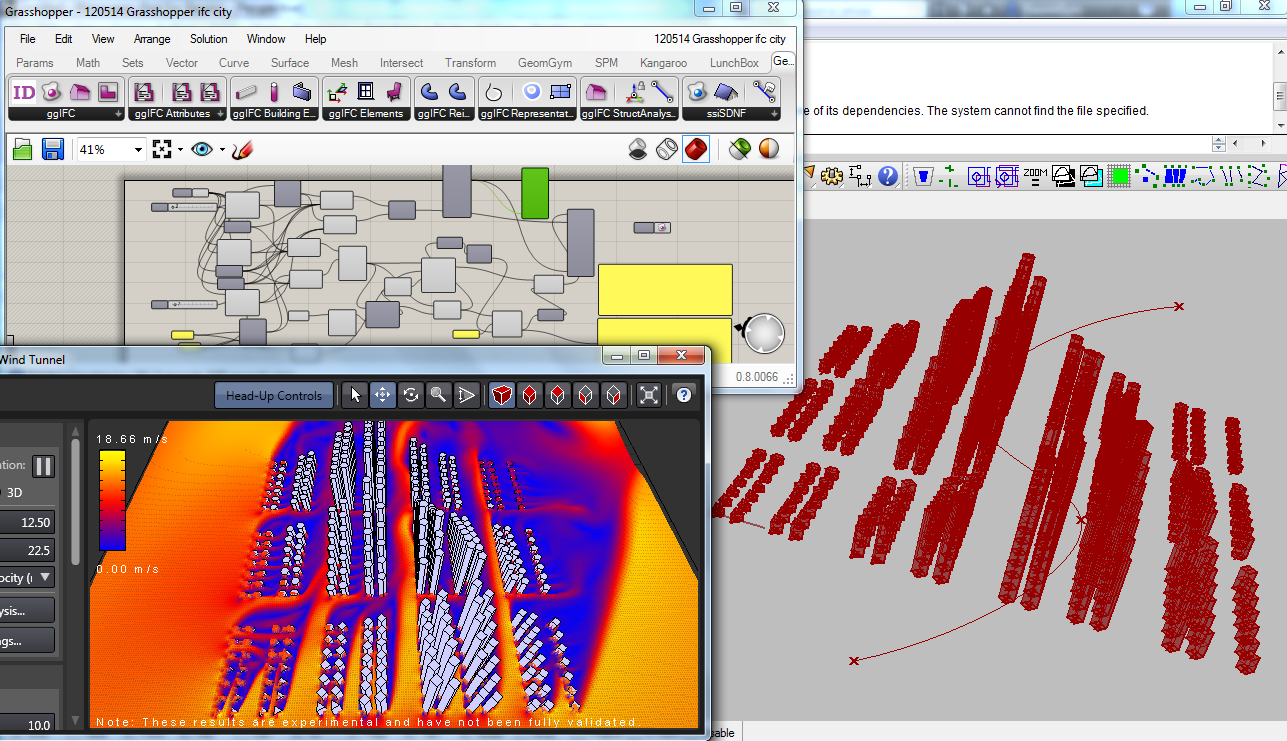
So, here's the process for the time being.  Bake the IFC file from this Grasshopper definition (or download ifc file here).  Then import the IFC into Revit using the GeomGym addon.  This will create a revit conceptual family in the same folder as the model (or download here).  You can then import this into Vasari and run analysis such as the virtual wind tunnel.

Look forward to hearing suggestions and requests for improvements.

EDIT 21st September 2012  Note now there is a Vasari addon for Beta1 that directly imports IFC files.  Note the above example generates an individual mass family element for each building (there is not means to generate an inplace family object from Revit API).  Here's a Grasshopper file where there is a single site family and here's the resulting IFC file (but this isn't as fast to generate as I might expect so patience will help).

Thursday, 10 May 2012

IFC Import Revit - Walls

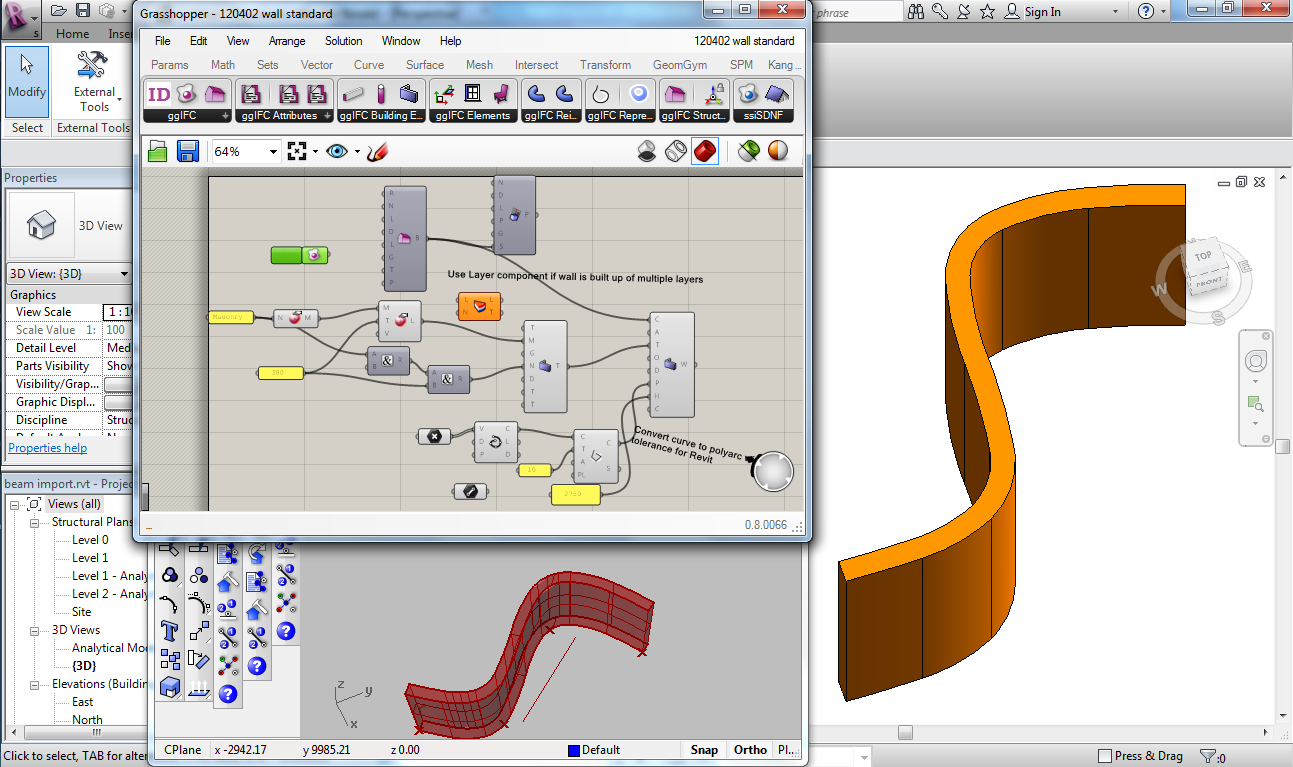
Todays build (http://www.geometrygym.com/downloads) of the Rhino and Revit plugins includes improvements related to wall model exchange.  This includes creation of families where they are not already loaded.

I initially started with testing the wall path curve as a NURBS (spline) curve, but Revit (2012) doesn't seem to permit spline paths so I used my BullAnt component to approximate it with a polycurve of arcs.

For the moment, the wall path curve has to be on the centroid (I'll look to enable face and offset locations) and I'll have to investigate whether I can enable my nurbs to polycurve routine using openNurbs outside of Rhino.

Look forward to hearing feedback and comments.  Openings are one of the items next on my agenda.  Improvements that come to mind include locking top/bottom to levels and I'm sure users can propose many more.
Grasshopper Model,  IFC File

Tuesday, 8 May 2012

GH to Revit, Families & Cardinal Points

I've been implementing many aspects of IFC model data that facilitate the "family" based approach consistent with Revit.

You'll notice many new components for Slabs, Walls, Columns, Beams and framing members to generate a "Type" (equivalent to a family in Revit) and then "standard case" components to generate objects based on that family.

This can include cardinal (or insertion) point locations (such as Top-Mid or bottom right) as this information can be conveyed in IFC4 (make sure you right click on the ssiBake button to enable this).  Here's the example model in the image above.  Plugins should be updated from http://www.geometrygym.com/downloads

If you use IFC2x3 the location of the beams should still be accurate, but a default "mid" insertion point will be used.

Next on the agenda (other than improving and expanding on the above) are aspects such as curtain walls, grids and grid relative locations.  If you've particular requests or suggestions, I look forward to hearing them.

Tuesday, 24 April 2012

NURBS GH to Revit

Another example model for you to test (Inspired by Tim Meador's post on the Grasshopper Forum).  I've been enabling nurbs profile/perimeter exchange using the IFC2x4 format (status Candidate Release, anticipated to be approved late this year).


Here's the example Grasshopper model, and the IFC file.  You need to right click on the SSIBake component and check the IFC2x4 option. This should be sticky then for the model (I need to check why it sometimes reverts when reopening the model).

Note I'm yet to find other viewers/software that can interact with this version of IFC, so for the time being it's only useful for my Rhino/Revit developments.  I'm still implementing other aspects of IFC2x4 (which might still have subtle changes), so be careful as exported file might not always open in the future.  I'm presently implementing advanced breps, that should permit much smaller IFC file sizes (and avoid the implications of meshing objects).  Look forward to hearing comments and suggestions.

Friday, 13 April 2012

GeomGym Revit Addon importing IFC

Here's some sample models and an explanation/demonstration of the work I'm advancing to import IFC models into Revit.


You can test for yourself.  Here's the grasshopper files used in the demonstration and some example IFC output..  You need to download the latest plugins from http://www.geometrygym.com/downloads

Note I've only been working on the Revit addon over a period of 3 months compared to 22 months for the Rhino plugin (although I can reuse 80 to 90% of the same code) so I still need to enable many aspects of IFC file importing.  But I will prioritize any example models and requests that come from users, so please don't hesitate to ask.  I look forward to hearing from you.

Wednesday, 14 March 2012

GeomGym IFC API

I've recently been considering and developing means of interacting directly to my IFC c# assembly without necessarily using my Grasshopper addon components (which in effect is a graphical wrapper to my assembly) or Rhino plugin commands.  This can enable academic and 3rd party interaction with my developments to generate IFCmodel files in a more direct manner.

Still early days, but already quite a powerful capability.  The example can be tried yourself if you've installed and licensed my IFC plugin.  You might have to alter the path to the referenced assembly in my plugin folder.    Grasshopper Model Download 


Scripting in Grasshopper is difficult for debugging and developing when there's more than a few lines of code, so you can reference the .dll from visual studio projects for Rhino/Grasshopper addons.  There's also means to execute my code outside of the Rhino/Grasshopper environment based on OpenNurbs (as my Revit Addon is doing).  Get in touch if you want to register interest, learn more or request particular features to be enabled.

Wednesday, 22 February 2012

Rhino/Grasshopper MEP Piping

The question arose on the Rhino forum today about exporting pipe objects into Rhino.  Refer here

I'm interested to see how Revit MEP handles IFC files (other than faceted brep/mesh) shape representations, as it can make the file much more compact and efficient.  Fitting such as elbows/bends can cause large problems if these "coordination" shape representations are used.


Here's my example model that you can download as Grasshopper model or IFC file to test yourself.  I look forward to hearing the results.

Monday, 30 January 2012

In Progress: Louisiana State Museum and Sports Hall of Fame

It's great to see details being published on projects that have been developed with assistance of Geometry Gym plugins for Grasshopper/Rhino.

ArchDaily has posted this article on the Louisiana State Museum and Sports Hall of Fame.

Method Design (in the design team with role as Geometry and Detailing Consultant) used the Geometry Gym plugin to exchange the Grasshopper geometric steel framing model into Autodesk Robot Structural Analysis  where analysis and design checks could be conducted accurately by David Kufferman P.E.  The model could then be exchanged beyond for coordination and fabrication.  You can also find more details and other links by David Stasiuk on the Grasshopper website.  

Friday, 27 January 2012

Revit IFC Plugin by Geometry Gym

I've recently been advancing development on a tool/workflow that's really needed to use Grasshopper to somewhere near it's full potential for Architecture/Engineering.  And that's to export the model into other BIM software with strengths and functionality that are not always evident or easily accessible in Rhino.

I started developing my IFC (neutral BIM format Industry Foundation Class) plugin (within Rhino/Grasshopper software) with the intent of enabling generation of BIM attributes and relationships to the already powerful geometric tool that is Rhino/Grasshopper, and then utilizing this in other BIM software without having to model everything again from scratch, and then maintaining/coordinating multiple models.

I touched a little about the current use of IFC as a model exchange in my technical paper last year.  Presently to be IFC certified (and there is a current drive to improve on this) you effectively need to import/export IFC models for coordination.  This can be done (with accuracy but certainly not efficiency) utilizing only two shape representations, linear extrusions and meshed/faceted breps.

This has led to a chicken/egg scenario, where BIM software vendors haven't imported advanced (and more efficient) shape representations (IFC is based on STEP model specification) because other vendors haven't exported them, and vice versa.

So whilst there is a long list of Software that interacts with IFC, it's really difficult (and I've discussed this with a number of big and small design firms in the past year or two) to use this "bridge" as it's intended.

Autodesk Revit is a very popular tool for Architects/Engineers to document and detail their projects.  However testing of means to import models using neutral BIM formats (primarily IFC and SDNF) hasn't resulted in much to boast about and utilize.  SDNF can generate native beam elements but can take hours (without succeeding) to import a pratical size roof model.  The Autodesk IFC plugin import generates reference objects, useful for coordination, drawing and even schedules, but as soon as you wish to edit or manipulate the objects, you nearly need to model it again (as families aren't utilized and aspects such as analytical representations not created).

So, with a few Geometry Gym users looking for a work flow to get Grasshopper models into Revit, I've been looking for improved ways to do this using the Revit SDK.  I started looking at direct model interaction, but for technical and practical reasons have decided a neutral bridge is the best way to do this.  Most of my c# IFC code is reusable (with some interaction changes) as a Revit plugin (this is my first plugin outside of the Rhino/Grasshopper environment), and I've today posted an example import of a steel frame roof (British Museum Great Court Roof) using my own IFC engine.


There's lots of improvements and work to do, but I'm confident with time I can create a powerful IFC engine within Revit (as I've already achieved within Rhino/Grasshopper).  The priorities for improvements are being driven by real project use of this tool (let me know if you have your own use for it) and will include curved members, orientations and synchronization options.  If you look closely at the image you'll see Revit has still tried to be clever with the bevel/miter at element connections, hopefully I can find a way to disable this (as an option) as I believe its significantly part of a slow import process.  Other objects including slabs, walls, MEP, etc etc will also be quickly added to the toolset.

It will be interesting to encounter the other hurdles and pitfalls in front of this development, but stay tuned to the blog for public release of this tool and examples of it's use.  Feel free to get in touch to learn more (and influence it's development) in the interim.

Wednesday, 30 November 2011

Nurbs To Structural Analysis Profile

At the request of the user, I've advanced the routines to convert arbitrary profiles (including nurbs perimeters) into the structural analysis section profiles capable of approximating this shape.

I've started with GSA, and will look into the other software equivalents shortly.  In GSA the perimeter is defined as a polyline (I have enabled an input to define acceptable deviation from original curve), and properties such as area and inertia are computed from the polyline bounds.


The torsion property is not calculated, so I also enabled a section property modifier component to allow user specification of this value (as well as the others).  There is a means to compute the torsional stiffness using soap film (which was the original reason I started coding mesh inflation), and I'll try to test this approach soon.  If you have any papers or technical explanations/demonstrations of this technique, it can only help accelerate this if you can share it.  Grasshopper definition can be accessed from here.

Wednesday, 23 November 2011

Tributary Areas and Variable Loading

I've finally got some final improvements made to some useful functionality that can save hours of spreadsheet processing (or the like thereof).
I've enabled functionality within Grasshopper to compute tributary areas for nodes contained within a structural grid, as well as generating node loads from varying loading phenomena such as snow drifting or wind pressure.

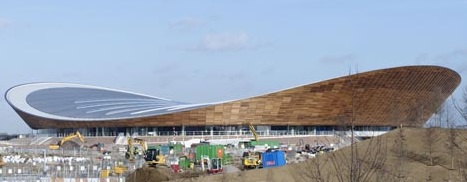
This algorithm was used (in a more time consuming and specific way) for the 2012 velodrome roof in applying wind pressures from wind tunnel testing advice.  At the time we were still optimizing cable spacing but still wishing to test multiple loading scenarios.  This routine can work out tributary areas for arbitrary grids (based on mid distance from adjacent nodes), grid normals (although load can be applied in a uniform direction if desired) and utilize a varying loading intensity at different locations.  This can be defined (or checked) intuitively from a surface (or polysurface) relative to a reference plane (the local z from datum defines the magnitude of loading pressure).

If you download the models below, you'll see it uses a reference plane from the structure (required for non-planar grids), and the relative position from the loading plane.  I haven't yet developed grasshopper visualization of the generated node loads (it's on my todo list along with boundary conditions, releases etc) so you'll have to visualize in the analysis software.  I also plan to implement face loading for finite elements in a similar manner, and any other suggestions that might arise from users, so don't hesitate to send them through.

Please check the results carefully, I hope you find it useful.  I'm also very happy to assist in applying or testing this with your own applications to projects.
GSA model,  SAP model (others to be added shortly).

Tuesday, 8 November 2011

Grasshopper Mesh to Finite Elements

The ability to convert Mesh from Grasshopper (it could have been generated or imported into Rhino) into finite elements with ability to triangulate quad faces failing shape checks has been in the Geometry Gym plugin for some time.  Recent requests from users recently enabled for the GSA plugin have included orthotropic material generation, nomination of finite element shape acceptance criteria (warning, severe warning, all) and ability to nominate varying orientation and property assignments throughout extent of mesh.  Update from http://www.geometrygym.com/downloads and study this file for GSA, and this file for SAP.


Thursday, 3 November 2011

SAP2000 Point Local Axis

For the Geometry Gym plugin users, remember that I encourage and look forward to receiving suggestions and ideas for improvements and new features to the tools.

Here's a fairly simple one that where identification of node local axis can be straight forward in Grasshopper, but not so easy to do within the Structural Analysis software.  This user wants to be able to apply a local coordinate system to the points (nodes) generated to SAP2000.

You can try for yourself here Download


Sunday, 16 October 2011

IFC MEP and Reinforcement

A quick post to highlight recent improvements to importing MEP and reinfocement data from IFC files, as well as Grasshopper Generation of these items.  Still lots of improvements I'd like to make on this front, so please get in touch if you have particular requests.

Tuesday, 11 October 2011

Rhino/Grasshopper to Tekla

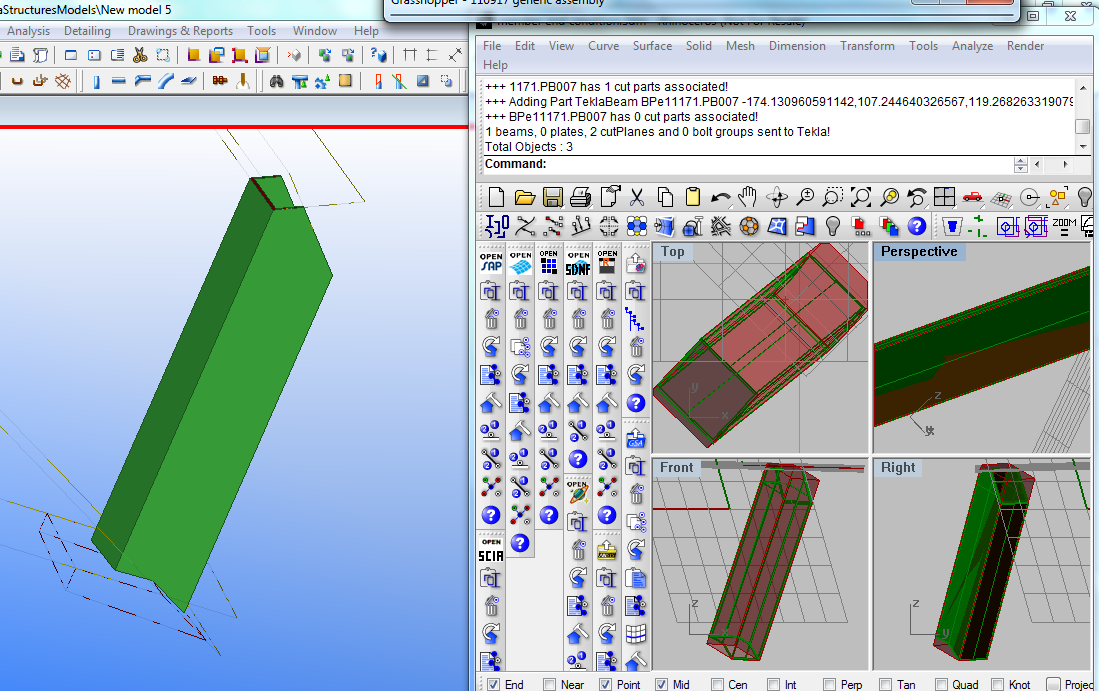
In the past two months I have been progressing a Grasshopper plugin that enables direct exchange of data between Rhino/Grasshopper and Tekla.  Tekla is a quite compehensive BIM application, although I have initially concentrated on the structures aspect for Fabrication.


This has been driven by a couple of projects where the steel work has been modelled in Rhino to fabrication detail and precision, either by python scripting or manual modelling.  Rhino does not presently have direct extraction to NC format for fabrication, so a means to automatically extract this information from Tekla without duplicating modelling efforts has many benefits.

As part of this, I have been advancing some "reverse engineering" components to convert rhino polysurfaces (that do not contain "explicit history" information such as profile extrusion, end conditions such as miters or cut parts, or drilled hole locations.  This can be implied from the features that the polysurface (brep) has.


I still find Grasshopper a very convenient means to assign attributes such as steel grade, finish, part/assembly numbering etc, so the Tekla plugin is only a GH addon at this moment.  I am happy to assist with explaining/applying this tool to your project if it is of interest.

To download the installer, please visit http://www.geometrygym.com/downloads

As part of a presentation I will make later this week to the Light Weight Structures conference in Sydney, I prepared a grasshopper definition to emulate the primary structure of the velodrome (which owes a lot of it's success to the generative approach taken by all designers).


Here's another example model that you can try for yourself. Download


Tuesday, 6 September 2011

Mesh False Color

A new component added to BullAnt for generating mesh with false color from a list of values.

Grasshopper Example

Friday, 26 August 2011

IABSE-IASS Symposium 2011

Taller, Stronger, Lighter

The 2011 IABSE-IASS Symposium is approaching very quickly now, and having received the program, I thought I would highlight a couple of recognized peers (real world and online) that might be of interest to followers of this blog.


Chris Wise, Expedition Director is presenting on the London 2012 Velodrome on Tuesday 20th at 3pm.  This project (shortlisted for the Stirling Prize) was extensively modeled in Rhino using Geometry Gym plugins to exchange with Oasys GSA.

Michael Drobnik is presenting From Image to Parameter. Double Curved Canopy Muenchner Freiheit at 4pm.

Following soon after at 5pm is Gennaro Sennatore presenting Pumping vs. Iron Large Scale Adapative spatial Structures for whole-life energy savings.

Wednesday the 21st has John Harding presenting Structural Form Finding using Zero-Length Springs with Dynamic Mass at 10am

My paper Generative Models Utilized for Superior Design Development is scheduled for 12:15pm

Thursday the 22nd, Milos Dimcic is presenting Structural Optimization of Free-Form Grid Shells at 9:30am.

I was fortunate to work for Koroush Kayvani for 6 months on Wembley, and he is presenting Performance-based Design of Tall and Longspan Structures at 11:45am.

Expedition colleague and friend Fred Labbe is at 4:45pm with Evolutionary Design for "Environmental
Expressionism"


On Friday the 23rd Odysseas Georgiou will present Interactive Structural Analysis & Form finding at 10am.

Other presenters recognized from the Grasshopper forum that are presenting include Roel van de Straat, Clemens Preisinger and I'm sure I've overlooked others, please let me know if this is the case.

It should be a great opportunity to meet in person some online friends, and swap notes and learn from each other the application and use of these powerful digital tools.

If you, a friend or a colleague are attending, please don't be shy in coming forward to discuss.  I look forward to the event and can't wait.

20th - 23rd September
Queen Elizabeth II Conference Centre
London

Monday, 18 July 2011

Generative Models improving Design Development

I'm not sure how obvious the collaboration is between Geometry Gym and [UTO] to develop the Rhino/Grasshopper addons, but it's nice to see a co-authored article published in the Taiwan Architects magazine, Tawain Architects 2001/07  


Here's the article in English
As performative design concepts become more accessible to designers, we will see more analysis tools being developed for the design process. As we establish methods for understanding surface-based-analysis, we will be moving into volumetric-base-analysis.

Generative tools such as Grasshopper3d (Robert McNeel Associates) and Maya (Autodesk) are being utilized to explore architectural projects and inform design decisions with increasing popularity. However, rapidly produced multitudes of options will not be utilized to full potential if entire design team assessments take days or weeks to fulfil. To maximise the potential of these tools, teams must efficiently assess multiple objectives and criteria, to seek optimal solutions. Utilizing the generative information model as input to analysis and simulation tools (including structure, services, environmental, construction programming and cost assessments) can facilitate superior design decisions.

This article outlines and demonstrates software developments enhancing Grasshopper3d as a generative design tool for the architecture and construction industry. Additional functionality enables designers to assign attributes of design elements that can be utilized in exporting the information model for wider design consideration. Present industry practises where multiple models are independently created require consuming efforts in updating and coordinating. Duplicated, abortive and redundant design efforts are rife, and given the time consuming nature of these tasks, the potential to improve and assist these procedures is enormous. There is scope for substantial improvements for this process in the earliest phases of design, when identifying the strongest concepts can have the greatest impact on the final product and the least constraint is experienced to change.

Structural Analysis

Generative modeling for developing structural analysis models has been prevalent for years, primarily in the form of authoring spreadsheets. Geometrical description using imports such as DXF or DWG cad models have also been used extensively, although this process typically requires manual application of analysis attributes not supported such as constraints, materials and loads.
Evaluation of performance relating to alternate design scenarios is accelerated by producing in bulk the structural analysis attributes as related to the generative model.
This is shown for the 3-dimensional proximity truss structure as a Structural Analysis with Geometry Gym plugin for Grasshopper and Oasys GSA

Building Energy Analysis

Ecotect is a highly visual software for architects to work with environmental performance issues. It is designed for early stages of conceptual design, and encourages play to understand environmental factors and interactions. Ecotect works on the principle of “progressive data input”, that means that it is prepared to give visual feedback even with very little information. Not all aspects of a scenario have to be spelled out in detail.
In fact the simulation can be done earlier, and as the model is refined, results become more accurate.

GECO is a Grasshopper plug-in developed by [UTO] that offers a direct link between Rhino/Grasshopper models and Ecotect. The Plug-in allows you to export complex geometries very quickly , evaluate the design in Ecotect and access the performances data, to import the results as feedback to Grasshopper. This could be done as single process or loop to improve performance and the design of a building in the context of its environment.
The single results of the process could be saved inside Rhino in the vertices of the analysis mesh to store data for later use inside different design approaches.