Showing posts with label Tekla. Show all posts

Sunday, 9 February 2014

BIMDayOut IFC4: The Shape of Things to Come


The BIM Day Out in Perth last year was a fantastic event, attracting presenters and attendees of a wide spectrum within the AEC industry.

Having been caught in the rain and cold (not really expected in Perth) earlier that week, my voice nearly disappeared (apologies, but the audio captured isn't too bad).


The presentation above primarily demonstrates the utilization of OpenBIM IFC to turn Grasshopper into BIM authoring software (and then receiving and utilizing the models in other software such as Revit or Tekla).

It aims to motivate software users (of all BIM enabled software) to demand more of the IFC implementation of their software, and hopefully shows a capability of IFC to convey intelligent models capable to use downstream in other software.


Congratulations and thanks to BIM Day Out committee for their work in arranging BIM Day Out, looking forward to many more of these events in the near future.

Tuesday, 29 January 2013

Melbourne OpenBIM Event

SIAL (Spatial information Architecture Laboratory) at RMIT University in Melbourne have been very generous to host an OpenBIM event on the evening of Monday the 18th February.  

It's a great privilege to announce that Dr Thomas Liebich is also in Melbourne at this time.  Thomas is the leader of the IFC Development team for Building Smart International based in Germany, and also a director of AEC3.

Thomas will present on the IFC standard (past, current and future) including the imminent release of IFC4 as an ISO standard.

I will also present on OpenBIM workflows and the research/development I've done in the past 3 years.  This will include insights into project application of generative BIM workflows from Grasshopper to Revit and Tekla.  I will also be discussing why current IFC implementations by BIM software vendors have only utilized IFC to a fraction of it's capability and potential.   I will also demonstrate benefits design teams can realize from collaboration of model sharing using IFC including Fabrication, Analysis and Design ( Structural, Energy, Egress, Building Regulation compliance), Facility Management etc.

Please rsvp if you'd like to attend to jonm@geometrygym.com or contact me for more details.  We plan to start presentations at 6pm, but will be there from 5:30pm at the multi-purpose room of the Design Hub (Level 1).
Design Hub
RMIT University
150 Victoria Street (Corner of Swanston & Victoria Street)
Melbourne VIC 3001


Note there will be a second event hosted at Arup on the Wednesday evening.  More details to be posted shortly.


Tuesday, 19 June 2012

Tekla exchange Grasshopper/Rhino

The Geometry Gym Grasshopper/Rhino plugin to generate and import Tekla model data will be presented by RhinoForYou and Decode at the France Tekla User Days in Paris and Toulouse.

Decode will be explaining the use of the connector to generate fabrication data from Grasshopper for the impressive CanopĂ©e des Halles de Paris project.  Hopefully I can post details on this here soon for those unable to attend.

I recorded a couple of youTube videos to further explain graphical programming in Grasshopper for Tekla users, and outline fabrication model attributes presently available including assemblies, welds, bolts and cut parts and planes. (I will gladly accept requests for more)


Wembley Arch Grasshopper File  Twisting Tower Grasshopper File

Tuesday, 11 October 2011

Rhino/Grasshopper to Tekla

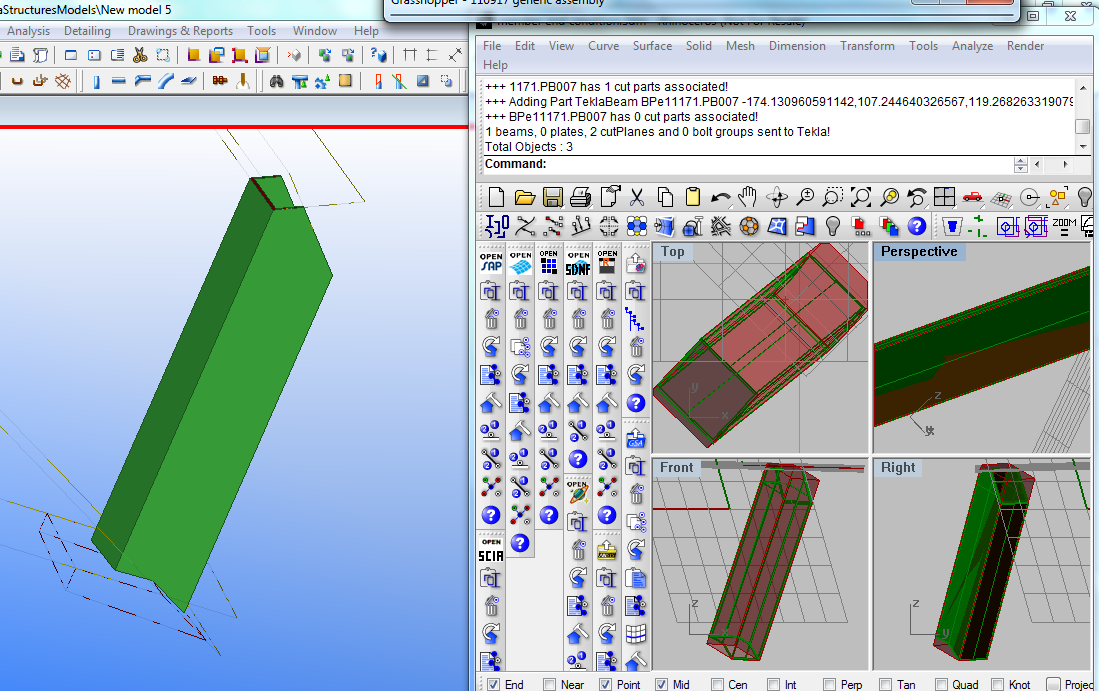
In the past two months I have been progressing a Grasshopper plugin that enables direct exchange of data between Rhino/Grasshopper and Tekla.  Tekla is a quite compehensive BIM application, although I have initially concentrated on the structures aspect for Fabrication.


This has been driven by a couple of projects where the steel work has been modelled in Rhino to fabrication detail and precision, either by python scripting or manual modelling.  Rhino does not presently have direct extraction to NC format for fabrication, so a means to automatically extract this information from Tekla without duplicating modelling efforts has many benefits.

As part of this, I have been advancing some "reverse engineering" components to convert rhino polysurfaces (that do not contain "explicit history" information such as profile extrusion, end conditions such as miters or cut parts, or drilled hole locations.  This can be implied from the features that the polysurface (brep) has.


I still find Grasshopper a very convenient means to assign attributes such as steel grade, finish, part/assembly numbering etc, so the Tekla plugin is only a GH addon at this moment.  I am happy to assist with explaining/applying this tool to your project if it is of interest.

To download the installer, please visit http://www.geometrygym.com/downloads

As part of a presentation I will make later this week to the Light Weight Structures conference in Sydney, I prepared a grasshopper definition to emulate the primary structure of the velodrome (which owes a lot of it's success to the generative approach taken by all designers).


Here's another example model that you can try for yourself. Download


Saturday, 3 July 2010

Exporting Grasshopper to Digital Project/Tekla/BIM

Recently I've been concentrating on development of neutral BIM file formats, with the primary goal of enabling parametric modelling of structure in Grasshopper and then exporting those models into other modelling software such as Digital Project, Tekla, BIM software and other design software.

One of the biggest frustrations I've experienced, and a large reason why I've undertaken an opportunity to develop Rhino Plug-ins is to reduce duplicated modelling work and the associated time and cost in coordinating models.  On a given project, each of the design consultants (ie architects, structural engineers, services engineers,  contractors and project managers etc etc) will build digital models of the project to analyze, review and communicate their work.  Even within the same office, there might be multiple models created (and more importantly maintained and altered as the project changes).  The ambition and philosohy of BIM is ideal to improve efficiency and productivity, but I'm not expecting this to be a new idea to anyone reading this post.


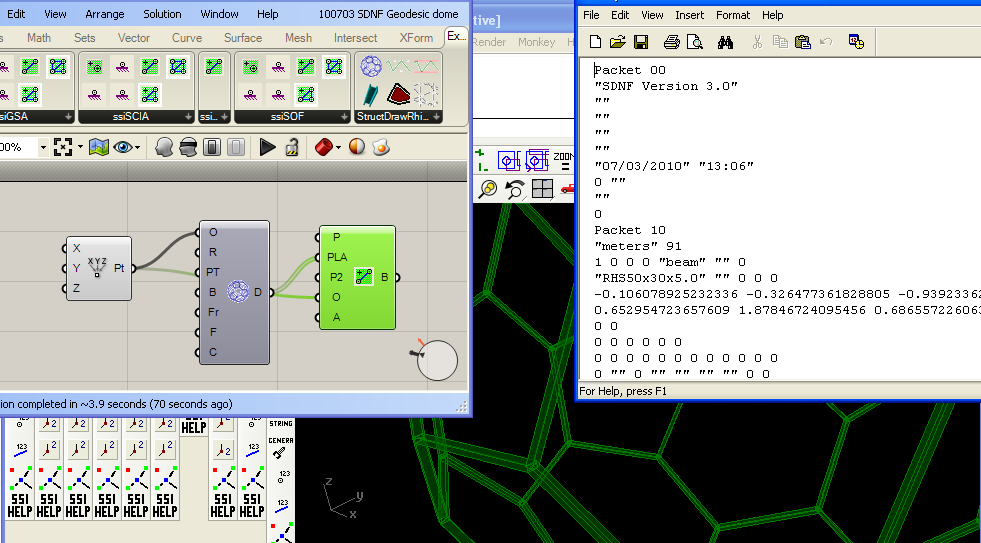
So, to parametrically generate BIM information from parametric modelling software such as Grasshopper is an amazingly powerful tool and workflow.  Already available for use and testing of this workflow is the Geometry Gym SDNF plug-in (available from http://www.geometrygym.com/downloads ), which is capable of skeletal or steel frame model exchange.  I've attached an example geodesic dome model for interested users to test and try this work flow.  Soon to follow will be IFC (Industry Foundation Class) attribute generation which will allow further information such as walls, slabs, doors, windows etc, and hopefully it goes a long way further than that.

Make sure you also download the StructDrawRhino plug-in for the Geodesic component, and you will need the free trial license to activate these Grasshopper components (follow the prompts).

Here's the Grasshopper definition and Rhino model with the SDNF property table saved in it: Rhino Model Grasshopper Definition
You can vary the inputs of the geodesic dome if you wish, and you can parametrically modify the beam profile using the property table accessible from the second button on the SDNF toolbar (use the spanner button to update the profile with that selected in the pull down menus).  When happy, bake the Steel Beams into the Rhino document to activate them (they are virtual whilst in preview mode) in the SDNF database.  If you alter the grasshopper definition and re-bake, the plug-in will try to detect the previous baked elements and delete/replace them.

If you click on the Export SDNF button, you are prompted to generate SDNF ver2 file (I believe Digital Project uses this format) or SDNF ver3 by default.  Then try importing the files into SDNF accepting software.

Note, there are issues to do with different software librarys labelling profiles with different formats, and you can try altering the catalogue definition.  It's possible a means of a mapping table facility may need to be provided in the near future.  If you can give feedback on what does work and what doesn't, I'm most grateful.

Some more examples coming soon, Here's my exports if you wish to try the generated files without the plug-in:

SDNF ver 2    SDNF ver 3