Showing posts with label Structure. Show all posts

Tuesday, 11 October 2011

Rhino/Grasshopper to Tekla

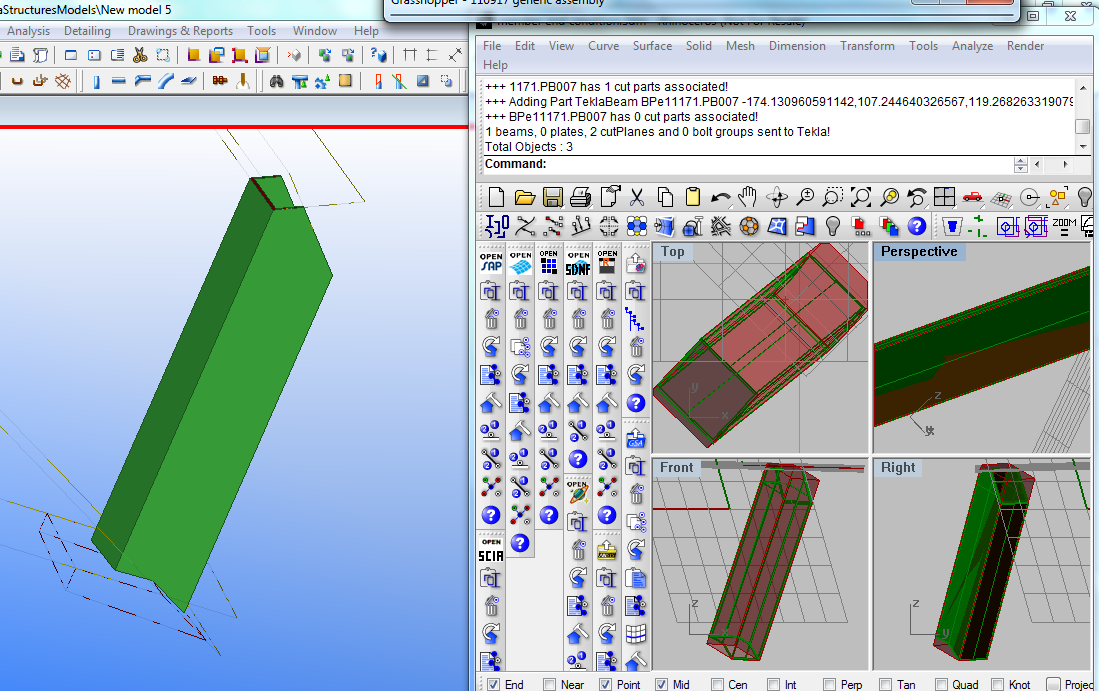
In the past two months I have been progressing a Grasshopper plugin that enables direct exchange of data between Rhino/Grasshopper and Tekla.  Tekla is a quite compehensive BIM application, although I have initially concentrated on the structures aspect for Fabrication.


This has been driven by a couple of projects where the steel work has been modelled in Rhino to fabrication detail and precision, either by python scripting or manual modelling.  Rhino does not presently have direct extraction to NC format for fabrication, so a means to automatically extract this information from Tekla without duplicating modelling efforts has many benefits.

As part of this, I have been advancing some "reverse engineering" components to convert rhino polysurfaces (that do not contain "explicit history" information such as profile extrusion, end conditions such as miters or cut parts, or drilled hole locations.  This can be implied from the features that the polysurface (brep) has.


I still find Grasshopper a very convenient means to assign attributes such as steel grade, finish, part/assembly numbering etc, so the Tekla plugin is only a GH addon at this moment.  I am happy to assist with explaining/applying this tool to your project if it is of interest.

To download the installer, please visit http://www.geometrygym.com/downloads

As part of a presentation I will make later this week to the Light Weight Structures conference in Sydney, I prepared a grasshopper definition to emulate the primary structure of the velodrome (which owes a lot of it's success to the generative approach taken by all designers).


Here's another example model that you can try for yourself. Download


Wednesday, 23 March 2011

Galapagos and GSA solver

It's still early stages of testing and development of some recent work I've been doing to enable access to GSA solver directly within Grasshopper (and importantly Galapagas).


The attached example is still primitive, I'll find a moment to extend it to include a stiffness per mass objective, but it does demonstrate a few aspects of using this technique.

All feedback appreciated, including requests for more components to save manual generation of GWA attributes (which is shown for the point load generation).

Grasshopper Definitions
GSA    SAP    SpaceGASS    Egret    Robot

Monday, 21 March 2011

Grasshopper-GSA Form Finding and Structural Analysis


Some really exciting new features to be activated in the next public build of the Rhino/Grasshopper plugin connecting to Oasys GSA that will allow generation of a complete Structural Analysis model within Grasshopper including loads, materials, analysis tasks and solver controls.  This will allow form finding of membrane and tensegrity structures incorporating advanced structural attributes including loads, with realistic materials.

This will not be real time "dynamic" response such as kangaroo physics plugin (which at present can not perform at real time speeds with realistic materials and stiffness).

Interrogating and utilizing analysis results will also be enabled, including more conventional models and frames.

If you have requests/suggestions for this release don't hesitate to get in touch.  Other popular solvers including SAP2000, Robot and Strand7 are expected to follow in the near future.

I'll shortly be posting more detailed instructions, but for the time being you can download the grasshopper definition from here : Grasshopper Definition  You'll need latest Plugin for GSA from http://www.geometrygym.com/downloads

Sunday, 20 February 2011

SCIA and Grasshopper

Thanks to the Scia Open Interface (which is a library for reading and writing XML data files for Scia) I'm pleased to present a new plugin for exchanging data with Nemetschek Scia.  Thanks in particular to Mark Flamer and Peter Zalman for their assistance with this.

Here's two example files to start with, the popular 3 pin truss generation

Rhino Model    Grasshopper Model   Scia XML Export
and generating a mesh model:

Rhino Model   Grasshopper Model   Scia XML Export

The Scia open interface is still work in progress, it's not allowing me to open models yet and I see node restraints are generated in xml but do not seem to be acknowledged by scia in the latest version.  So please use with care.  But if you would like to see these improvements and more in the tools, the more interest I can demonstrate I'm sure will encourage fixes and support for this development.

Installation instructions are here: http://www.grasshopper3d.com/group/geometrygym/forum/topics/installing-geometry-gym  I'd recommend installing StructDrawRhino as it is also used in some sample models.

Friday, 16 April 2010

Parametric Structure Models in Grasshopper

The first Geometry Gym plug-in for Grasshopper with Structural model Interaction has just been uploaded.
http:\\www.geometrygym.com/downloads  Versions for GSA, Strand7/Straus7 and Sofistik are available, other modelling interaction will soon follow (ie  SAP, SDNF, Robot etc).  If you want to influence the priority list for release, send me an email with which version you'd like to use.

So, here's a screen capture demonstrating the use of the plug-in, and sending the parametric model out of Rhino into GSA (similar for Strand7, Sofistik and others).


And to try this for yourself, here's the sample models shown and a revisit of the Gherkin.

First Grasshopper Definition to generate structural beams :          GSA Robot SAP2000 Sofistik Strand7


A simplified version of Newcastle Millennium bridge.  I haven't had a chance to add a slider to rotate it yet :-(

Associated Rhino model with properties :  GatesHead Rhino Model
Grasshoppper Definition : GSA Robot SAP2000 Sofistik  Strand7


Revisiting the mini-Gherkin.  Note I'm sure if I get a chance to study Grasshopper Trees and Branches this definition could be simplified a bit.

Associated Rhino model with properties :  Gherkin Rhino Model
Grasshopper Definition : GSA Robot SAP2000 Sofistik Strand7


Monday, 8 March 2010

BullAnt GrassHopper Geodesic Dome


This example file demonstrates calling on the BullAnt Geodesic dome function from within Grasshopper, as well as sweeping structural profiles including member orientation. Try for yourself, but you'll need a valid license (or free trial license) file to do so.
Previous Versions

Monday, 4 January 2010

Structure Analysis Model from Curves


Try for yourself the routines to generate structure analysis model from curves and points in Rhino.
Rhino Model from here.

Wednesday, 23 December 2009

Orienting Structure to Rhino Surfaces

Here's an example/tutorial for you to follow to use the plug-in to calculate member orientation angles based on the defining surface normal or nearest point.


To try this yourself, here is the Rhino file: Rhino Ellipse


Now the same basic procedure will work presently with 3 analysis packages, GSA, Sofistik (shown) and SAP2000. Strand7 and others coming shortly.
Here's the analysis models:
GSA
Sofistik (Note LOCA 0 is assumed for the moment.)
SAP2000

More instructions coming soon....

Sunday, 1 November 2009

British Museum Great Court Roof using StructDrawRhino

Another stunning, innovative structure that has inspired similar projects since.  It's a favorite space of mine, especially on a bright sunny day when the shadows and reflections are mesmerising.


Here's some papers, blog posts and links I found to determine how Happolds and Fosters designed this amazing roof.

http://opus.bath.ac.uk/14111/1/ChrisDeakin2001.pdf
http://www.enhsa.net/downloads/publi/con2004/102_Williams.pdf
http://people.bath.ac.uk/abscjkw/

So, now you can try to do something similar yourself using the structural plug-ins for Rhino.  My routines and commands don't follow exactly the description from the paper, but they allow something similar to be created.


To try this for yourself, the input Rhino file can be downloaded from here

I'm currently coding up algorithms for more powerful force density routines to include dynamic relaxation, but in the interim you can try the sdrMeshRepelVertex command to relax a rigid mesh outline with discontinuitys at nodes/vertices for continuing edges.  I used the sdrZigZagCurves command to divide the initial radial lines to generate the starting Grid.

From the starting flat grid, we can use the plug-in command sdrMeshProjectVerts to project the mesh vertices onto the mathematical surface.

Then we start the mesh relaxing process.  The command  sdrMeshRepelVerts uses force density to repel mesh vertex away from their neighbours.  Naked/Free edges/vertex will be restrained.  The more loops or iterations you allow, the better the result you will get.  Note that you can nominate a target surface that will vertically project the vertex back onto the surface (if you don't, the mesh will naturally flatten).  I found the best result was by nominating the balance force option for a number of iterations, and then to run a few loops of the target equal length for edges.

You can then extract the medge edges to curves using the sdrMeshDupEdges command.  By applying a structural profile (I assumed a much larger hollow profile than that used), the plug-in will automatically sweep the centreline curves.


There is also a number of routines in development for form finding and finding minimal surfaces.  Blog posts with worked examples will shortly follow, but if you look at sdrMinShapeMesh function you can try it for your self.  The other sdrMesh.... routines allow manipulation of mesh generated in Rhino to transform it to arrangements more appropriate for analysis/solving.

If you've any requests, ideas or suggestions for these routines (or need more help or other examples), don't hesitate to get in touch.

Monday, 17 August 2009

User Defined Profile Libraries

I've just uploaded a new version of the Structural Drawing Plug-in with plenty of improvements. I'm preparing to post a detailed tutorial showing how these new tools could be implemented to model the Beijing Water Cube, so watch this space.

The plug-in can now use profile libraries defined by the user. These are simply created by creating (or copying) rhino files into the plug-in sub-folder at C:\Documents and Settings\USER\Application Data\GeometryGym\UserProfiles\ or C:\Users\USER\Application Data\GeometryGym\UserProfiles\  (Note folder may be hidden, and is now reported on the Manage Tab of the main StructDrawRhino dialog). There's an example file there showing some numbers and letters as example profiles (you'll find them now listed in the selection drop down boxes). You can create as many collections of profiles as you like, and they will be grouped by filename (First Selection Box), layer name (Second Selection Box) and object name (Third selection box). The profiles must be located in the model YZ plane, and the origin is used as the default insertion point. A curve can be used to define a simple singular profile, or if it has voids, add it as a planar surface.


The files should allow easily to share and collate your profiles, let me know if you have any suggestions for improvements. Note that if you later rename either the file, layer or object, it will have to be reassigned. Another quick tip, the profiles are now assigned by dragging the first button over your model view (instead of clicking the button as per the previous release).

Sunday, 5 April 2009

More on Manipulating Structural Models

Here's the next entry with a tutorial/example on ways of manipulating your structural analysis model within Rhino.


It's been a month since my last post, but there's some great improvements on the way for the plug-ins, and you can see a sneak preview of some of this on the video clip for this tutorial.


Better quality AVI file for those that can't access YouTube or wish to see more detail.

In the current released version, when nodes are moved in the model, the centreline curves and 3d extrusions remain static to the old node positions.   To update the geometry, the nodes are updated in the GSA model, and then the existing Rhino representation must be manually replaced by running the interpreter command again.

The plug-in has now been developed with dynamically response to geometry manipulations made in rhino.  If you move or relocate nodes in the Rhino, the element centrelines (and shortly 3d extruded representations) will update on the new node positions.  Also the upcoming version will automatically replace/update any existing structural data in the rhino file, rather than require the user to manually delete it to avoid duplicate representation.

Anyway, here's some more methods/examples for manipulating your structural model node positions in Rhino.

This example is a simple representation of a bridge, for which we wish to investigate the form and shape.

GSA model: archBridge.gwb
Robot model: archBridge.str
SAP200 model : archBridge.s2k
Sofistik model: archBridge.dat
SpaceGASS : archBridge.txt
Strand7 model : archBridge.txt
And if you want the 3dm file with the parabola : archBridge.3dm

Open the GSA model, and copy all the GWA data from the gateway.
In rhino, right-click on the ggInterpretGWA button to generate the structural analysis model in Rhino (alternatively you can export the model to GWA from GSA, and left click to open the file).

We don't really need the 3d extrusions at this stage, so either untick the option, or turn off the layers once interpreted.

I'm going to use some point moving commands I've scripted into the latest version of the BullAnt plug-in which you can download from here: http://www.geometrygym.com/downloads  Note that most of the new commands and functionality being developed will only become active when you activate the free trial license for the plug-ins.
I hope to give some tutorials for creating your own RhinoScripts for some of these manipulations in the near future.


The first bulk node manipulation we're going to do, is to move the points to equidistant points on the parabolic curve which represents the arch shape we wish to assess and update our model.


In the BullAnt plug-in toolbar, there is a button for the command ggUtilMovePointsToCurve that will prompt the user for multiple points, and then a curve to move the points onto.  During the selection of the curve, the user may toggle whether end points on the curve should be included, and a tolerance for coincident points (useful if your model contains joints with coincident nodes).  The command will attempt to sort the points into a logical order, and then update each point position to the corresponding division point on the curve.  A confirmation step visually draws arrows and dotted lines representing the changes (you might have to zoom depending on the scale of the movements and overall selection).  Once updated (remember the present version of the plug-in won't update the element centerlines yet), you can copy the node coordinates to the clipboard, and then update your GSA model by pasting the GWA data to the gateway.

The video then shows the same sequence having scaled the parabolic shape to give it more height.

Note that the hangers are no longer vertical for our new profile.  If retaining vertical hangers is important, we'll use a slightly different , you can mov the vertical hangers in position so that they all interesect the desired parabolic curve.  I recommend changing the current layer to a new empty layer, so we can bulk select in a minute.  Then run the Rhino Intersect command to generate a point at all of the desired intersection locations.   We can then use the BullAnt plugin command ggUtilMatchClosestPoint to select an original and target set of points to match.  As the command can utilise a specified maximum distance to move any point, we can bulk select all the structural nodes by right-clicking on the "OasysGSA NODES" layer.  Confirm the selection (by enter or spacebar), and then similarly select the newly created intersection points in the second selection.  Every point in the first group within distance of a point in the second group will have it's position updated to the nearest, and we can update our analysis model.

Rhino allows so many methods and options of generating/updating point positions that you'll find you're only really restricted by your own experience or ability to learn new ones.  Many situations might require manual processing, others will allow techniques such as grasshopper, scripting and all tools and plug-ins available.  Some upcoming blog entries will look at these options.


Sunday, 22 February 2009

Geometry Gym Rhino Plug-ins


Geometry Gym (or SSI - Smart Structural Interpreter)

SSI is the beta branding for some Rhino plug-ins I've been developing for aprox. the past 12 months.

This project started as a response to various tasks and problems that I'd faced as an engineer working on projects of novel geometry.  Primarily this was difficulties in creating analysis models, checking analysis models were coordinated with project drawings, and for coordinating with other design team members, and in how to efficiently describe the geometry of these projects to other team members.  But the biggest problem was manipulating models to keep pace with project changes and evolution.  Although analysis software has made progress in this area, the methods were still largely manual and time consuming.  And part of the problem was that primarily all our drawings were done in 2D (plans, sections, elevations), and the CAD tools we used were focussed on this nature of drawing.

When I arrived in London and started work at Expedition I was introduced to Rhino3D, which is an amazing 3d modelling environment.  Rhino has many attributes that make it a fantastic tool for a designer, and I'll list a couple.  It can import and export so many CAD file formats (including Microstation and AutoCAD), it has an amazing support group of advanced users on it's newsgroup that will offer advice for everyone from beginner to expert, and for a scripter/programmer, it offers an excellent environment to allow automation and customization for generic and specific problems.

So the two initial plug-ins I've been developing for Rhino are an importer/exporter for structural analysis programs, and a catalouge structural section drawing tool.  I'll provide some instructions/examples for using these plug-ins in my following posts.  The importer/exporter allows automated drawing and updating of a 3d structural model without the need for manual interpretation and coordination.  It also provides advanced tools for efficiently manipulating and generating structural analysis data from within Rhino, so that analysis models can take advantage of the more sophisticated sculpting ability of Rhino than exists commonly in analysis programs.  The structural drawing plug-in is basically a sub-set (or by-product) of the first plug-in, that allows designers to manually extrude structural members, or easily add structural sections to rhino documents from a library of standard profiles.