Showing posts with label Archicad. Show all posts

Tuesday, 29 January 2013

Melbourne OpenBIM Event

SIAL (Spatial information Architecture Laboratory) at RMIT University in Melbourne have been very generous to host an OpenBIM event on the evening of Monday the 18th February.  

It's a great privilege to announce that Dr Thomas Liebich is also in Melbourne at this time.  Thomas is the leader of the IFC Development team for Building Smart International based in Germany, and also a director of AEC3.

Thomas will present on the IFC standard (past, current and future) including the imminent release of IFC4 as an ISO standard.

I will also present on OpenBIM workflows and the research/development I've done in the past 3 years.  This will include insights into project application of generative BIM workflows from Grasshopper to Revit and Tekla.  I will also be discussing why current IFC implementations by BIM software vendors have only utilized IFC to a fraction of it's capability and potential.   I will also demonstrate benefits design teams can realize from collaboration of model sharing using IFC including Fabrication, Analysis and Design ( Structural, Energy, Egress, Building Regulation compliance), Facility Management etc.

Please rsvp if you'd like to attend to jonm@geometrygym.com or contact me for more details.  We plan to start presentations at 6pm, but will be there from 5:30pm at the multi-purpose room of the Design Hub (Level 1).
Design Hub
RMIT University
150 Victoria Street (Corner of Swanston & Victoria Street)
Melbourne VIC 3001


Note there will be a second event hosted at Arup on the Wednesday evening.  More details to be posted shortly.


Saturday, 11 August 2012

GH to Archicad (OpenBIM IFC)

With the new release of Archicad v16, it permits me the opportunity to download and test improvements made to IFC support.  This is still in progress, and initially I was a little disappointed, but revisiting a single test case for Constructive Solid Geometry (CSG) or Solid Element Operation as it might be known to Archicad users leads me to confidence and optimism about IFC exchange with Archicad.

So here's the test case that has me excited.  I posted nearly 2 years ago about most software reverting to "coordination" IFC models, primarily faceted breps (meshed surfaces).  Possibly this is acceptable for visualization and clash detection (but not efficiently) but if you want smart models that can be enhanced and edited down stream, IFC is derived from STEP and capable of many advanced and accurate shape representations.  This is also explained in my Technical Paper from last year.

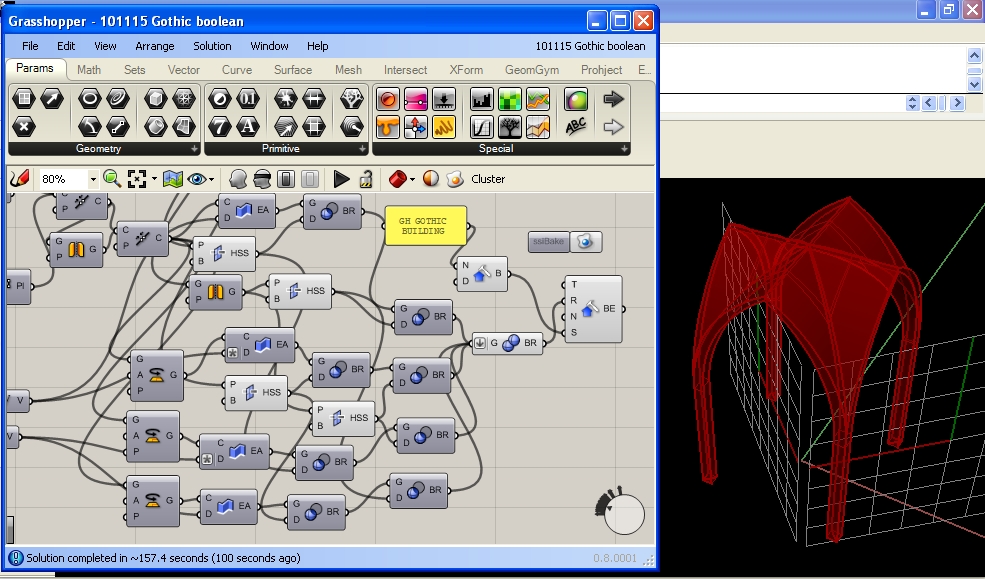
So in two years I've still had no success in other software understanding the CSG steps that can define a gothic arch roof, until now.  I was thrilled to see Archicad v16 import this accurately, which might enable some really exciting project work flows from Grasshopper.  Perspective view doesn't seem to render anything, but isometric does (maybe someone can explain why).


Here's the IFC file if you want to test yourself, and here's the Grasshopper Definition.

The first test I ran also worked quite well.  Archicad doesn't have nurbs (at least yet), so I converted the nurbs curves for the Klein Building slabs into polycurves.  IFC file, Grasshopper Def


Now for some tests with scope for improvement. I tried to import an IFC file with swept beams.  It was pleasing to see the straight beam generate accurate edit handles, but none of the curved beams worked.  IFC4 does not appear to developed, so useful improvements such as cardinal points are not accessible.  IFC file, Grasshopper Def


And the final test for the time being, the waffle structure.  Slabs come in fine, seems to be an orientation issue for the walls.  Geometry looks accurate otherwise.  IFC file, Grasshopper Def


I'm hoping to do some more tests very soon.  If you've comments, suggestions or questions, I look forward to hearing them.

Monday, 15 November 2010

Grasshopper generating IFC Update

Thanks to Scott Davidson for the gothic inspiration and a great example of Grasshopper Generation and the ensuing improvements for exporting from Rhino/Grasshopper to IFC (can be imported by BIM software such as Revit, Archicad, Digital Project, Microstation, Tekla etc etc).

IFC2x4 is anticipated for formal release next year, which includes NURBS representations and should enable Rhino/Grasshopper models to be exported with greater accuracy and with greater ease.  Until then, IFC2x3 does provide means and ways to represent shapes and forms created by nurbs, and this blog post will demonstrate some of them.  Note most software does not recognize or work with all aspects of IFC, so approximations such as the first for faceting the brep may be your only option.

The first shape representation is using a faceted brep, effectively meshing the surface.  Unless your original shape is a faceted brep (with planar faces and straight edges), there will be a loss of detail, but you can control the refinement of the meshing process (introducing more faceted faces).


Grasshopper Definition    Generated IFC Data

Theoretically it's not necessary to approximate the form with a faceted brep if you can generate it using processes and shape representations within the IFC specification.  This includes extrusion and boolean operations which can be used to form this vault.  In practice, it seems very few BIM software and IFC viewers acknowledge or are capable of these operations, so you may be forced to use the faceting approximation.  Please test these models with your favorite IFC software and feel free to post your observations as comments.

Most programs comply with extrusion, here's Archicad importing this model:

Grasshopper Definition    Generated IFC Data

I've struggled to find even an IFC viewer to successfully display this model, but there's no warnings of non-compliance.  The boolean operations should work with a rhino model absolute tolerance set to 0.01


Grasshopper Definition    Generated IFC Data

Please post any comments with software you can or can't open these models with.  If you've any particular shapes you'd like to export that aren't successful, please get in touch and I can help advise.

Instructions for getting started with the IFC plugins are found here.