Thursday, 30 June 2011

BIM Enhancements for Rhino/Grasshopper

RhinoForYou presented Geometry Gym BIM enhancements for Rhino3d / Grasshopper3d at the BIM Day event in Paris earlier this week.

It was a good opportunity to enhance and improve the IFC plugin testing IFC files generated with other software.  Improvements have been made for file processing times (with more to come, but better for all IFC authoring software to produce higher quality files).

This clip shows importing of the Tekla House model authored in Archicad, and an associated MEP file.  It demonstrates the new IFC tree data viewer in Rhino.


The second clip is a model prepared by VisualARQ, the IFC data was optimized using Geometry Gym tools to reduce the file size by a factor of 10 (permitting more acceptable access time for Rhino/Grasshopper).  The file is then imported and edited in Grasshopper, first deleting some members and then generating a new parametric set.


This plugin is undergoing continual improvement, if you have requests or requirements that you would like included, please get in touch to discuss them with me.

Sunday, 19 June 2011

Grasshopper Catalogue Profiles


I've just added a new feature to BullAnt addon for Grasshopper that allows easier nomination of catalogue profiles (before you had to use a string).  If I haven't already included a catalogue profile or range that you would like to use, please get in touch and I'll add it ASAP.  http://www.geometrygym.com/downloads

Monday, 6 June 2011

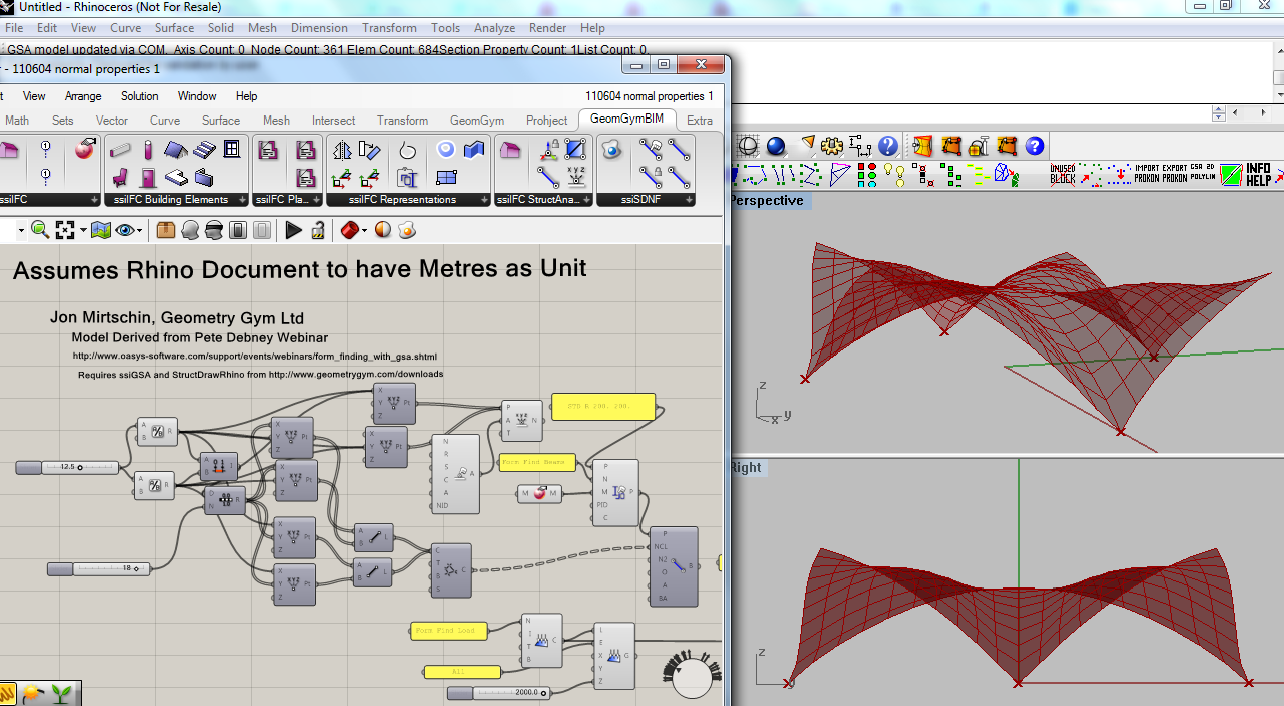
Grasshopper GSA Form Finding Examples

I sat in on the recent Oasys GSA webinar on form finding conducted by Pete Debney, for those that missed it, don't despair.  Here's a recording of it:


I think it's a great resource and introduction/explanation of some of the form finding options provided by the Oasys GSRelax solver.

I also think each of the 3 example models are well suited to a parametric exploration using Grasshopper (using the Geoemetry Gym plugin to exchange the model data with GSA), and I'm posting these definitions here so you can try for yourself.

The gsa relax solver is not included in the standard evaluation license, but you can email them and ask for access to it.  I'm still enhancing the plugin in a few areas, you might see toolbars wander if you run GSA as a background service (ie if you don't have GSA running when you open the grasshopper definition, the plugin will start it in the background for you).  If you do have GSA open and Grasshopper appears to "freeze", activate GSA and close any confirmation dialogs that might appear.

Generating the model with geometric shapes using  BullAnt will be enhanced shortly, as well as any user requests so send them through.  Make sure you have latest GSA and BullAnt plugins from here: http://www.geometrygym.com/downloads and the definitions are derived on the basis of a rhino document being open with metre units.


Force Density form finding of a cablenet bridge.  Grasshopper Definition


Compression Shell form finding using Analysis properties.  Grasshopper Definition


Soap Film form finding of tensile membrane with back stay  Grasshopper Definition

Friday, 3 June 2011

Rhino v5 Extrusions, GeomGym Plugins


I've been enabling Rhino version 5 light weight extrusions to the Geometry Gym Rhino plugins, that uses less memory, meshes faster and saves out to much smaller file sizes.
http://wiki.mcneel.com/rhino/rhinov5status_extrusions

I've seen and heard some positive demonstrations and reports of this improvement, but decided to do some quick bench marking for myself and the results are impressive.

I prepared some approximate models of the British Museum Great Court Roof as part of this discussion with importing IFC models into Archicad.


The model comprises 5180 members, and the improvements from v4 to v5 are really impressive.
I've benchmarked using the Geometry Gym IFC importing plugin, which will use the new extrusions when running in v5.  If you want to try for yourself, install/update the plugin, http://www.geometrygym.com/downloads and the IFC data file can be downloaded here.

Or, if you just want to open the rhino model, download here.

Time wise (only considering the generation of the extrusions, ignoring file reading time etc) it took 35 seconds on my computer to generate 5180 version 4 extrusions.  In version 5, it took less than a second.

When saving out the rhino model, version 4 produced a file 74 MB, version 5 produced a 3 MB file.

And there is very little lag or delay when panning, zooming and rotating the v5 model, in comparison with v4.

The only drawback (which should be a temporary matter and improved as the beta version of 5 progresses) is a much slower start up time for version 5, particularly 64 bit (which seems to be made slower by loading geometry gym plugins which is being investigated).

However, if you're working on skeletal or frame models, I strongly recommend taking the step up and using v5.  Extrusion elements also can accomodate end miter planes, which I'm in progress of enabling to the plugins.

With regards to the IFC plugin, you might also notice some other speed improvements when importing large faceted brep models generated by other BIM software.

Feel free to comment with any suggestions or observations of your own.


Tuesday, 3 May 2011

Grasshopper - Solver Results

I've been progressing components for accessing Structural Analysis solver results recently, primarily for Oasys Gsa and others will shortly follow.  I'm also in early phases of testing a structural analysis solver directly within a Grasshopper plugin (to analyze linear static frames directly and extract results, which should be quicker than sending data to external programs).

I've enabled a Grasshopper component for my vector field to streamlines algorithm, also the work of SPM is looking encouraging in this area.


If you don't have Oasys GSA, you can try this definition (I've baked some principal stress lines into the Rhino document) or you can test the result extraction from GSA using this definition.  Both need this Rhino document with basis mesh.


Also, here's a definition demonstrating generation of false color mesh for Von Mises Stress.

I've also enabled some new features for form finding directly from within Grasshopper using the GSA fablon solver, here's a nice example from a user request outlined here.  Grasshopper Definition


I look forward to hearing suggestions and questions from users.

Thursday, 31 March 2011

GH GSA Form Finding Tensegrity

A first study of tensegrity form finding using GSA, I plan to add to this post some models of some nice towers.


Here's a start to that, note I'm looking to adjust the component calculation order as the solver needs to be computed only after all other components have calculated.  If you have problems of only partial model update, try deleting and adding a new solver component (or disabling, recomputing, and enabling).

Model Files to try yourself.

Wednesday, 23 March 2011

Galapagos and GSA solver

It's still early stages of testing and development of some recent work I've been doing to enable access to GSA solver directly within Grasshopper (and importantly Galapagas).


The attached example is still primitive, I'll find a moment to extend it to include a stiffness per mass objective, but it does demonstrate a few aspects of using this technique.

All feedback appreciated, including requests for more components to save manual generation of GWA attributes (which is shown for the point load generation).

Grasshopper Definitions
GSA    SAP    SpaceGASS    Egret    Robot

Monday, 21 March 2011

Grasshopper-GSA Form Finding and Structural Analysis


Some really exciting new features to be activated in the next public build of the Rhino/Grasshopper plugin connecting to Oasys GSA that will allow generation of a complete Structural Analysis model within Grasshopper including loads, materials, analysis tasks and solver controls.  This will allow form finding of membrane and tensegrity structures incorporating advanced structural attributes including loads, with realistic materials.

This will not be real time "dynamic" response such as kangaroo physics plugin (which at present can not perform at real time speeds with realistic materials and stiffness).

Interrogating and utilizing analysis results will also be enabled, including more conventional models and frames.

If you have requests/suggestions for this release don't hesitate to get in touch.  Other popular solvers including SAP2000, Robot and Strand7 are expected to follow in the near future.

I'll shortly be posting more detailed instructions, but for the time being you can download the grasshopper definition from here : Grasshopper Definition  You'll need latest Plugin for GSA from http://www.geometrygym.com/downloads

Tuesday, 22 February 2011

GH to GSA Finite Elements from Area and Regions


A feature that I added earlier this year was the ability to generate Structural Areas and Regions for Oasys GSA from Grasshopper.  You then mesh the structural areas within GSA.

Here's the associated models to try yourself.

Rhino model  Grasshopper Definition

Sunday, 20 February 2011

SCIA and Grasshopper

Thanks to the Scia Open Interface (which is a library for reading and writing XML data files for Scia) I'm pleased to present a new plugin for exchanging data with Nemetschek Scia.  Thanks in particular to Mark Flamer and Peter Zalman for their assistance with this.

Here's two example files to start with, the popular 3 pin truss generation

Rhino Model    Grasshopper Model   Scia XML Export
and generating a mesh model:

Rhino Model   Grasshopper Model   Scia XML Export

The Scia open interface is still work in progress, it's not allowing me to open models yet and I see node restraints are generated in xml but do not seem to be acknowledged by scia in the latest version.  So please use with care.  But if you would like to see these improvements and more in the tools, the more interest I can demonstrate I'm sure will encourage fixes and support for this development.

Installation instructions are here: http://www.grasshopper3d.com/group/geometrygym/forum/topics/installing-geometry-gym  I'd recommend installing StructDrawRhino as it is also used in some sample models.

Friday, 4 February 2011

IFC Generating Quantity Measurements

I've just returned from two weeks of visiting various architecture and engineering firms in Paris and London, and one of the latest features that generated lots of interest is the new developments to generate quantity and
planning information within Grasshopper and Rhino3d.


Not only can you have real time response of these quantities, but also export these downstream to your other BIM software for use in schedules, reports etc etc.  I have set it up so the property sets and element quantities are fully customizable, so that you can ensure the attributes are tagged as your BIM software will recognize it (In the attached example, I've based this on a Revit sample file provided to me).

There's a lot more that I can enable with this including building services, costing, building performance etc etc, so if you have ideas or requests, please send them through.

Please test this out for yourself on this sample tower model, you'll need the latest IFC plugin.  Installation instructions: http://www.grasshopper3d.com/group/geometrygym/forum/topics/installing-geometry-gym

Grasshopper Model
IFC Model Data


Friday, 31 December 2010

IFC Shape Representations

In response to the discussion on IFC Shape Representations on the IFC Linkedin group I decided to implement some further shape representations as examples and to find out other software reading and exporting models utilizing them.  From previous posts and comments, it seems like SCIA engineer might not have too many companions in recognizing and utilizing shapes other than the standard extrusions and faceted breps (which are often approximations).  I'm sure there might be some slight amendments I might make to the tags of the representations (I've implemented them as best I can interpret the informal propositions) but it's difficult to clarify them as examples of these files seem scarce.

Feel free to try and import these models into your BIM software (including viewers), and either comment or email me and we can tally which shape representations can be used with other software.

 A bounded plane surface : Grasshopper Model  IFC Export

 A revolved area solid : Grasshopper Model  IFC Export

A section spine solid : Grasshopper Model  IFC Export
Note that IFC does not explicitly define the surface geometry between the section spine profiles, I've used Rhino loft for the time being.

A swept solid : Grasshopper Model  IFC Export 
(I need to implement IFC curve parameterizations for more curves so this component is hidden for the time being)

Wednesday, 15 December 2010

BIM: Importing IFC to Grasshopper


New features added to Geometry Gym IFC plugin for Grasshopper and Rhino.  You can now import existing IFC data files into Grasshopper (more improvements on visualization coming soon).  There's also specific components for tagging objects as slabs, walls, stairs, beams etc.  Download from http://www.geometrygym.com/downloads 

Example definition for importing IFC data: ReadIFC.gh
Sample IFC data file : testTower.ifc

Priority will be given to new features requested by users, please keep sending them through.

Saturday, 11 December 2010

Fantastic projects utilizing Geometry Gym

Obtaining permission from commercial users (and their clients) is difficult, but it's nice to see some fantastic work published from the University of Innsbruck.  Congratulations to [UTO] and the designers researching and studying there.

Thomas Buseck has recently posted details of his projects at http://thomasbuseck.blogspot.com/  Very impressive and I look forward to seeing more of your work.


Benjamin Ennemoser has also been combing the various Rhino/Grasshopper plugins to develop the form for his thesis project, details at his blog http://ennben.blogspot.com/


It's always great to see the project work assisted by the Geometry Gym tools (thanks to all those who email me images and details), and if you'd like to also see your work raised here, please let me know.

Monday, 29 November 2010

Grasshopper IFC generation New Features


New features for extruding and remapping (arraying) building information models (BIM) in Grasshopper, exporting using IFC.
YouTube demonstration uploaded shortly.


Monday, 15 November 2010

Grasshopper generating IFC Update

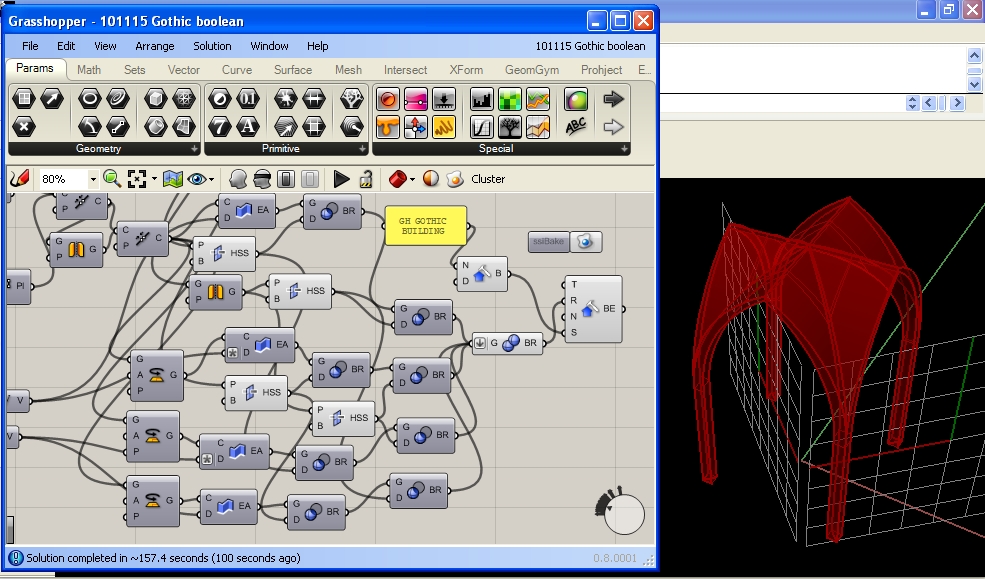
Thanks to Scott Davidson for the gothic inspiration and a great example of Grasshopper Generation and the ensuing improvements for exporting from Rhino/Grasshopper to IFC (can be imported by BIM software such as Revit, Archicad, Digital Project, Microstation, Tekla etc etc).

IFC2x4 is anticipated for formal release next year, which includes NURBS representations and should enable Rhino/Grasshopper models to be exported with greater accuracy and with greater ease.  Until then, IFC2x3 does provide means and ways to represent shapes and forms created by nurbs, and this blog post will demonstrate some of them.  Note most software does not recognize or work with all aspects of IFC, so approximations such as the first for faceting the brep may be your only option.

The first shape representation is using a faceted brep, effectively meshing the surface.  Unless your original shape is a faceted brep (with planar faces and straight edges), there will be a loss of detail, but you can control the refinement of the meshing process (introducing more faceted faces).


Grasshopper Definition    Generated IFC Data

Theoretically it's not necessary to approximate the form with a faceted brep if you can generate it using processes and shape representations within the IFC specification.  This includes extrusion and boolean operations which can be used to form this vault.  In practice, it seems very few BIM software and IFC viewers acknowledge or are capable of these operations, so you may be forced to use the faceting approximation.  Please test these models with your favorite IFC software and feel free to post your observations as comments.

Most programs comply with extrusion, here's Archicad importing this model:

Grasshopper Definition    Generated IFC Data

I've struggled to find even an IFC viewer to successfully display this model, but there's no warnings of non-compliance.  The boolean operations should work with a rhino model absolute tolerance set to 0.01


Grasshopper Definition    Generated IFC Data

Please post any comments with software you can or can't open these models with.  If you've any particular shapes you'd like to export that aren't successful, please get in touch and I can help advise.

Instructions for getting started with the IFC plugins are found here.

Monday, 8 November 2010

Grasshopper generating IFC


Here's the first demonstration and example files for generating IFC from Grasshopper using the Geometry Gym plugin.  This is just the beginning.  IFC can be read by popular software such as ArchiCAD, Digital Project, Revit, Tekla etc etc.  Download the plugin from http://www.geometrygym.com/downloads


Please try for yourself, and report all ideas, suggestions and problems.

Here's the Rhino file for the tower massing:  Rhino Model
Here's the Grasshopper definition:  Grasshopper Definition

Monday, 25 October 2010

Autodesk Robot Geometry from Grasshopper

More explanations and descriptions coming soon.  I'm in the process of developing creation of Robot Geometrical objects within the parametric Grasshopper environment.  Presently this includes polyline base revolutions panels and cladding panels.  I expect further development of aspects such as poly curves (with arcs) and extrusions to be added.  Please report any suggestions, observations and ideas and they will implemented with priority.

Polyline Revolution
Rhino model
Grasshopper Definition

Cladding Panels


Friday, 15 October 2010

Update to Rhino/Grasshopper plugin to SAP2000


The Rhino/Grasshopper plug-in generating and exchanging data with SAP2000 has been upgraded and now includes the option to "bake" the data directly from Grasshopper to SAP using the OAPI COM interface. No longer needed to save and import a text data file.

If you rebake variations, you might observe historic nodes being left in the model, I am still awaiting advice from CSI on an issue with deleting unattached points. There's more improvements that will quickly be implemented, if you've ideas or suggestions, please send them through.


You can download the 3 pin truss models : Rhino and Grasshoper
The basic mesh and restraint model:  Grasshopper

Friday, 17 September 2010

Network Patch


A stunning example of checkerboard patch, the Pavillion Serpentine Gallery (Photo by Sylvain Deleu ) prompted David Lister to ask how to achieve this in Grasshopper.  The algorithm is a variation to the curve network filleting routines in BullAnt, so I've just uploaded a new build with it included.


Rhino Model available from here.
Grasshopper definition available from here.

Wednesday, 8 September 2010

Tessellation - Approximating a Form


An example of using the recent addition of Tessellation to the BullAnt Grasshopper plug-in to define a shape or form.  Mario Vergara recently posted to the Grasshopper forum about using L-systems to generate a shape or form.  Whilst the attached example doesn't utilize this, there is no reason why the base form could not be generated in a plug-in like Rabbit and then used as input to the BullAnt tessellation.  Improvements on the agenda include curve definitions for the intersection path.  Please send through other ideas and suggestions.  Be patient with the algorithm, it should run faster in Rhino v5.

You can download the Grasshopper / Rhino file from here.

Wednesday, 1 September 2010

Grasshopper Curve Force Density (Great Court Roof Revisited)

First thing to state, I plan to revisit the topology (connectivity) of the curve network to get a better result, so please come back soon and check if it's updated.

I've been adding curve network force density tools into the Grasshopper BullAnt plug-in.  There's progress on using the Great Court Roof as an example.


You can download the Rhino file here and the Grasshopper definition here.

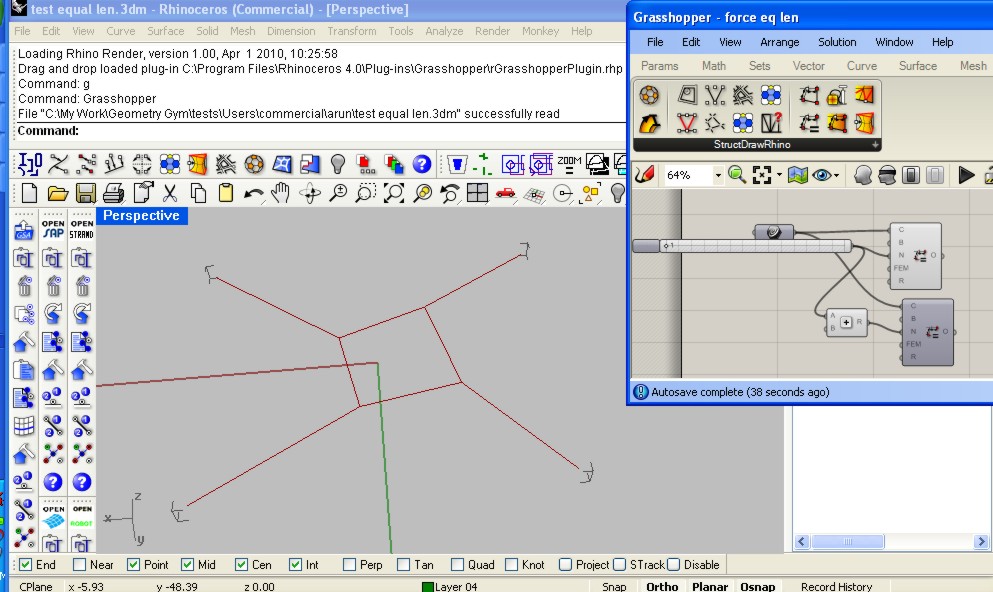
Also possibly of interest is a "reverse" force density where it iterates through the network nodes and repels the neighbouring nodes rather that move the current node, which can be used in some circumstances to produce equal length curves.  Here's one example, although it seems there's lots of scenarios where it's not so successful. I've put a slider on the iteration so you can see it converge on an answer, and it's producing two adjacent loop results so you can compare.


Rhino file here and Grasshopper file here.

Digital Design Workshop Johannesburg

A fantastic event held last month, arranged by Hugh Fraser and supported by PG Group, it was a fantastic opportunity to meet South African Architects and Designers keen to learn more about Grasshopper3d and Digital Design and Fabrication. Kristof Crolla and Jeroen van Ameijde led the workshop, I provided additional advice and assistance with technical aspects and Grasshopper modelling.

It's worth watching this entertaining summary by Hugh which is the next best thing to having been there:


Leon Krige (who exhibits a lot of his fantastic photos, check out http://www.fluide.co.za ) took a few of the photos shown below.

We were all disappointed the glass could not be cut in time, but still some great results were achieved and we all learnt a lot.  The format of splitting into small groups, building prototypes of ideas and stage design competitions to reduce down to three final projects was a great format.

If you get down to Main Street quickly enough, you can still find the mdf sculpture in the sewer drain (but rain will be here soon) and possibly the other projects in Main Street Life.

Some of the work shop participants in Main Street Life foyer under one of our final three projects.


Leon has managed to make the sewer look relatively attractive, but it's hard to convey the smell on the internet.


The third of the projects which is yet to be realized in real life.


Hopefully this is the first of a many of these types of events. If you're interested, please don't hesitate to get in touch.

Friday, 20 August 2010

Tessellation in Grasshopper (Beijing Watercube revisited)


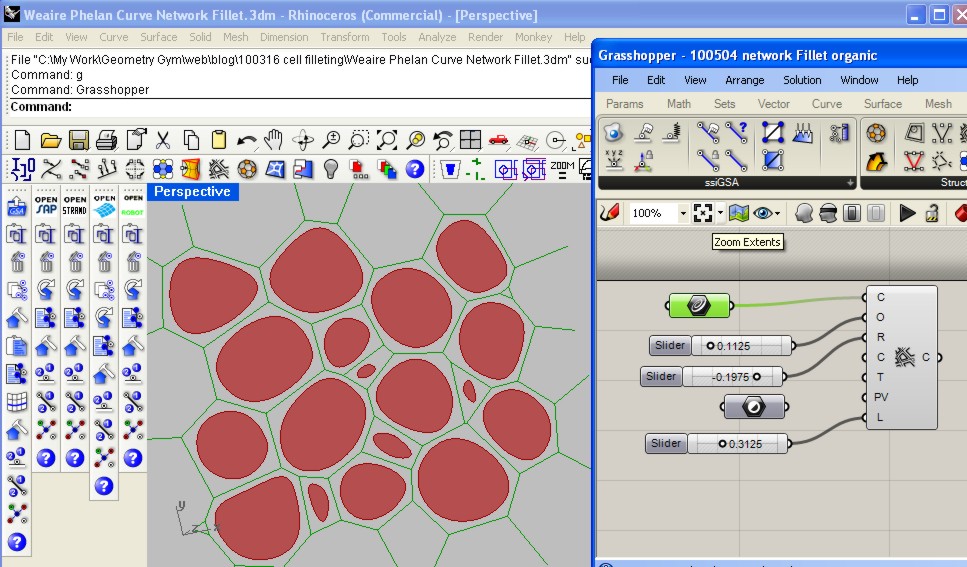
I've started enabling the tessellation (polygon packing) routines in Grasshopper, and the Bejing Watercube is such a great example of using this geometry I thought I'd post the grasshopper version.
Rhino file from here.
Grasshopper definition here.


I've also started implementing some spline variable cell filleting, I'm still looking at options for generating best results.  An improvement on constant radius results.

Thursday, 5 August 2010

Three pin Truss

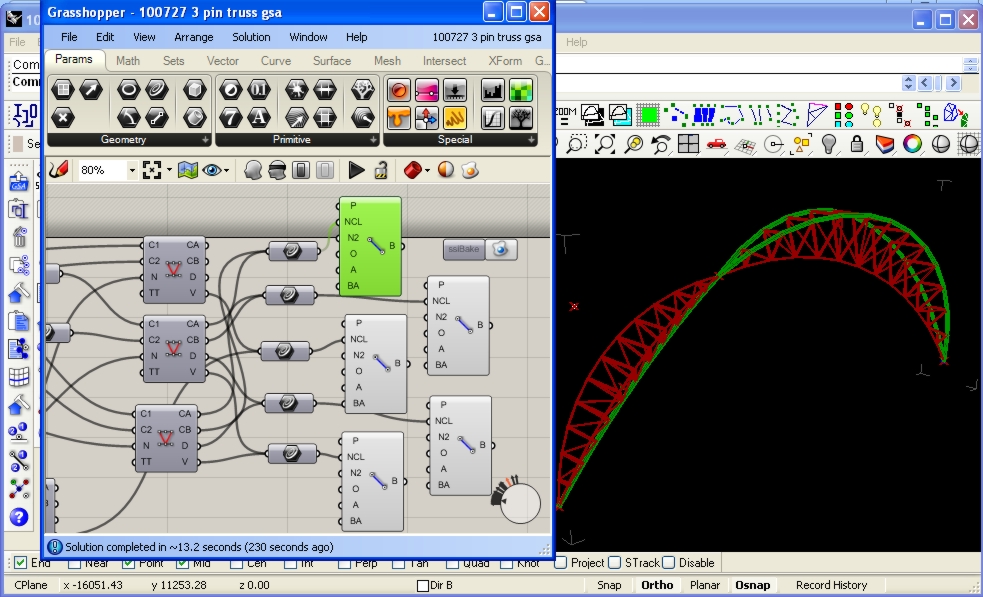
An assignment was set recently at UC Berkeley to model a three pin truss utilized at the previous Eurostar Terminal at Waterloo, London.


A question on how to generate this arrangement was posted on the Grasshopper forum, and I think it is a fantastic example of structure that should be modelled in Grasshopper to achieve the best design possible.

The assignment due date has passed (I hope), so I think it's safe to post how I would use the Geometry Gym plug-ins to model this structure.  This includes a new BullAnt Truss component, that allows you to select the nature of the truss connectivity (at present, Pratt, Warren, Vierendeel and Brown) between two chord curves.  Other truss types are available upon request.

GSA screen Capture

Download AVI from here

Robot screen Capture


Download AVI from here

And the files so you can try for yourself:

Rhino Model (Required for all Grasshopper Definitions)

Grasshopper definition for BullAnt
Grasshopper definition for Oasys GSA
Grasshopper definition for Autodesk Robot
Grasshopper definition for SAP
Grasshopper definition for SDNF (Steel detailing neutral format can be exchanged to BIM software such as Tekla and Digital Project)
Grasshopper definition for Strand7/Straus7
Grasshopper definition for Sofistik

Other software models coming soon, please request to accelerate.

Monday, 2 August 2010

Skulpture

Wieland Schmidt recently posted two stunning renders of sculpture produced utlizing Geometry Gym StructDrawRhino routines in Grasshopper3d.  The components for geodesic domes, cell filleting and mesh inflation were used.  Fantastic work Wieland, thanks for sharing and would be nice to see them created in the real world.


Thursday, 29 July 2010

Generate Finite Element model in Rhino and exporting back Stress Results


I've had a number of requests lately about analyzing Rhino/Grasshopper mesh and using the mesh results back in Rhino/Grasshopper.  Thanks to Tom of [UTO] for this particular example, which was mesh created in Grasshopper using WeaverBird.

The video above demonstrates this using GSA (which is free for Students).
The rhinocommand ssiGSAMeshtoGWA translates a Rhino mesh into GWA data which can be pasted in the gateway. The mesh remains unchanged, although the routine will triangulate quad faces that are not within GSA planar tolerance.

Node Restraints, finite element properties and loads are quickly applied in GSA, and the model analayzed for results. The results can be exported to a text file, which can then be loaded back into Rhino. The number and nature of these results can be controlled in the GSA export process, and this can be saved into the GSA model as saved output to be recalled later. ssiGSALoadResults command can be used to open this results file and false-colour the mesh. Note the model data must be active in either the Rhino (or Grasshopper) plug-in (thus I imported the model data back).


There's improvements to be implemented in the near future, including other results and importing into a Grasshopper component.

Here's the files so you can try for yourself:
Rhino Mesh Model
GSA Model


19th August 2010
Some further discussions and experiments with finding vector fields on the Grasshopper forum  for the model have prompted me to append this blog post.


I've added some additional functionality to ssiRhinoGSA (v0.8.0037 and newer) to allow using the command ssiGSALoadResults command to interpret Principal stress data results.  An export such as this results.txt
can be read, I used a scale factor of 2e-8 and unsigned magnitude to generate the lines representing the principal stress vector field.  You can then set these lines in Grasshopper and convert to vectors as shown in this Grasshopper model.

Tuesday, 20 July 2010

Sofistik CableNet from Grasshopper

Progress of Sofistik model generation from Grasshopper3d. You can now nominate lowest acceptable beam and node generation, apply beam properties such as releases, offsets as well as node restraints. Lots more coming


youTube screen capture or download better quality AVI from here


Tuesday, 6 July 2010

Grasshopper3d to Autodesk Robot - CableNet


Progress on the Geometry Gym Rhino3d/Grasshopper3d to generate and exchange Autodesk Robot data is going well, above is a screen capture demonstrating parametric exploration of a cablenet roof (I've used beam profiles so they can be seen in the video).

You can realize great benefits to determining an efficient cable scheme by parametrically exploring the spacing, depth and easily measuring quantity, cable end fittings etc.

In a near release the node restraint generation in Grasshopper will also be added to the Robot Model, and on the agenda in the short term is to add ability to generate loads, hinges and lists within the Grasshopper definition.

To try yourself, download the plug-in from http://www.geometrygym.com/downloads
The Rhino model with saved profile/view can be downloaded here: Rhino Model
And the Grasshopper definitions : (Other programs coming shortly)
ROBOT
GSA

Saturday, 3 July 2010

Exporting Grasshopper to Digital Project/Tekla/BIM

Recently I've been concentrating on development of neutral BIM file formats, with the primary goal of enabling parametric modelling of structure in Grasshopper and then exporting those models into other modelling software such as Digital Project, Tekla, BIM software and other design software.

One of the biggest frustrations I've experienced, and a large reason why I've undertaken an opportunity to develop Rhino Plug-ins is to reduce duplicated modelling work and the associated time and cost in coordinating models.  On a given project, each of the design consultants (ie architects, structural engineers, services engineers,  contractors and project managers etc etc) will build digital models of the project to analyze, review and communicate their work.  Even within the same office, there might be multiple models created (and more importantly maintained and altered as the project changes).  The ambition and philosohy of BIM is ideal to improve efficiency and productivity, but I'm not expecting this to be a new idea to anyone reading this post.


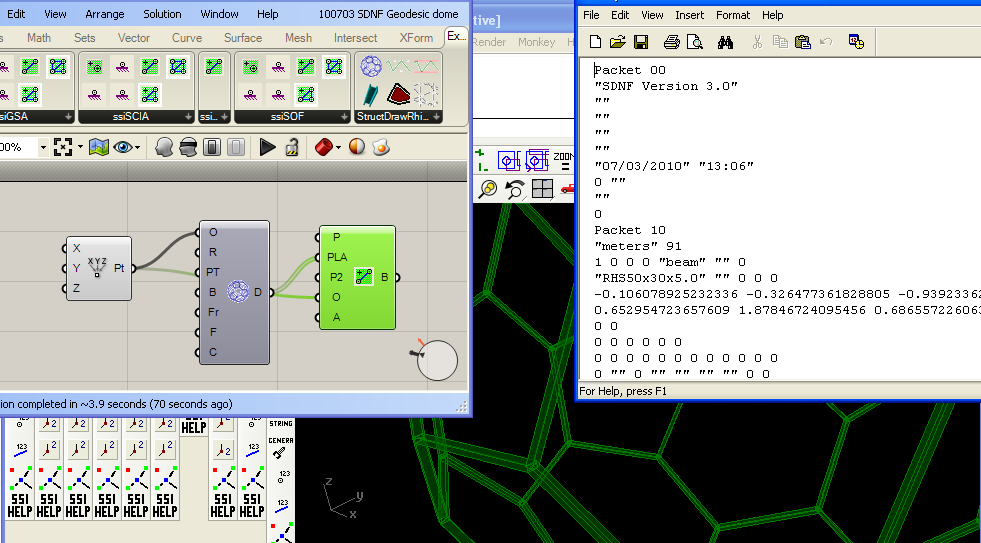
So, to parametrically generate BIM information from parametric modelling software such as Grasshopper is an amazingly powerful tool and workflow.  Already available for use and testing of this workflow is the Geometry Gym SDNF plug-in (available from http://www.geometrygym.com/downloads ), which is capable of skeletal or steel frame model exchange.  I've attached an example geodesic dome model for interested users to test and try this work flow.  Soon to follow will be IFC (Industry Foundation Class) attribute generation which will allow further information such as walls, slabs, doors, windows etc, and hopefully it goes a long way further than that.

Make sure you also download the StructDrawRhino plug-in for the Geodesic component, and you will need the free trial license to activate these Grasshopper components (follow the prompts).

Here's the Grasshopper definition and Rhino model with the SDNF property table saved in it: Rhino Model Grasshopper Definition
You can vary the inputs of the geodesic dome if you wish, and you can parametrically modify the beam profile using the property table accessible from the second button on the SDNF toolbar (use the spanner button to update the profile with that selected in the pull down menus).  When happy, bake the Steel Beams into the Rhino document to activate them (they are virtual whilst in preview mode) in the SDNF database.  If you alter the grasshopper definition and re-bake, the plug-in will try to detect the previous baked elements and delete/replace them.

If you click on the Export SDNF button, you are prompted to generate SDNF ver2 file (I believe Digital Project uses this format) or SDNF ver3 by default.  Then try importing the files into SDNF accepting software.

Note, there are issues to do with different software librarys labelling profiles with different formats, and you can try altering the catalogue definition.  It's possible a means of a mapping table facility may need to be provided in the near future.  If you can give feedback on what does work and what doesn't, I'm most grateful.

Some more examples coming soon, Here's my exports if you wish to try the generated files without the plug-in:

SDNF ver 2    SDNF ver 3