Wednesday, 1 September 2010

Digital Design Workshop Johannesburg

A fantastic event held last month, arranged by Hugh Fraser and supported by PG Group, it was a fantastic opportunity to meet South African Architects and Designers keen to learn more about Grasshopper3d and Digital Design and Fabrication. Kristof Crolla and Jeroen van Ameijde led the workshop, I provided additional advice and assistance with technical aspects and Grasshopper modelling.

It's worth watching this entertaining summary by Hugh which is the next best thing to having been there:


Leon Krige (who exhibits a lot of his fantastic photos, check out http://www.fluide.co.za ) took a few of the photos shown below.

We were all disappointed the glass could not be cut in time, but still some great results were achieved and we all learnt a lot.  The format of splitting into small groups, building prototypes of ideas and stage design competitions to reduce down to three final projects was a great format.

If you get down to Main Street quickly enough, you can still find the mdf sculpture in the sewer drain (but rain will be here soon) and possibly the other projects in Main Street Life.

Some of the work shop participants in Main Street Life foyer under one of our final three projects.


Leon has managed to make the sewer look relatively attractive, but it's hard to convey the smell on the internet.


The third of the projects which is yet to be realized in real life.


Hopefully this is the first of a many of these types of events. If you're interested, please don't hesitate to get in touch.

Friday, 20 August 2010

Tessellation in Grasshopper (Beijing Watercube revisited)


I've started enabling the tessellation (polygon packing) routines in Grasshopper, and the Bejing Watercube is such a great example of using this geometry I thought I'd post the grasshopper version.
Rhino file from here.
Grasshopper definition here.


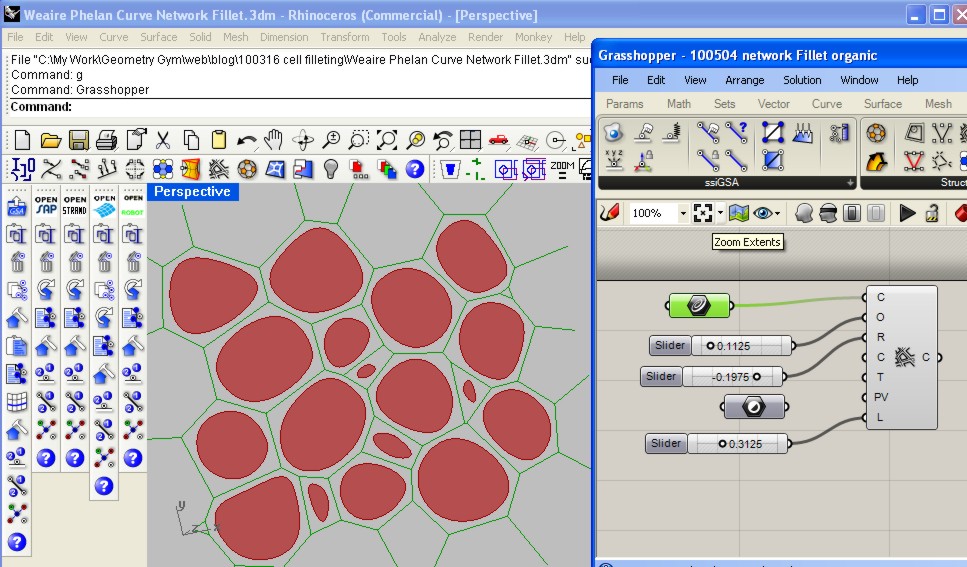
I've also started implementing some spline variable cell filleting, I'm still looking at options for generating best results.  An improvement on constant radius results.

Thursday, 5 August 2010

Three pin Truss

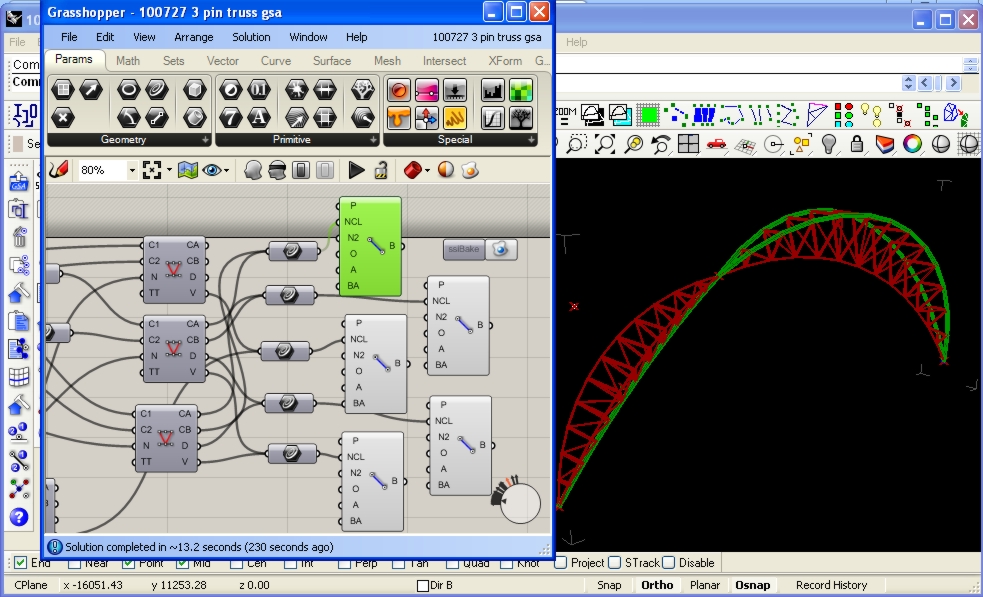
An assignment was set recently at UC Berkeley to model a three pin truss utilized at the previous Eurostar Terminal at Waterloo, London.


A question on how to generate this arrangement was posted on the Grasshopper forum, and I think it is a fantastic example of structure that should be modelled in Grasshopper to achieve the best design possible.

The assignment due date has passed (I hope), so I think it's safe to post how I would use the Geometry Gym plug-ins to model this structure.  This includes a new BullAnt Truss component, that allows you to select the nature of the truss connectivity (at present, Pratt, Warren, Vierendeel and Brown) between two chord curves.  Other truss types are available upon request.

GSA screen Capture

Download AVI from here

Robot screen Capture


Download AVI from here

And the files so you can try for yourself:

Rhino Model (Required for all Grasshopper Definitions)

Grasshopper definition for BullAnt
Grasshopper definition for Oasys GSA
Grasshopper definition for Autodesk Robot
Grasshopper definition for SAP
Grasshopper definition for SDNF (Steel detailing neutral format can be exchanged to BIM software such as Tekla and Digital Project)
Grasshopper definition for Strand7/Straus7
Grasshopper definition for Sofistik

Other software models coming soon, please request to accelerate.

Monday, 2 August 2010

Skulpture

Wieland Schmidt recently posted two stunning renders of sculpture produced utlizing Geometry Gym StructDrawRhino routines in Grasshopper3d.  The components for geodesic domes, cell filleting and mesh inflation were used.  Fantastic work Wieland, thanks for sharing and would be nice to see them created in the real world.


Thursday, 29 July 2010

Generate Finite Element model in Rhino and exporting back Stress Results


I've had a number of requests lately about analyzing Rhino/Grasshopper mesh and using the mesh results back in Rhino/Grasshopper.  Thanks to Tom of [UTO] for this particular example, which was mesh created in Grasshopper using WeaverBird.

The video above demonstrates this using GSA (which is free for Students).
The rhinocommand ssiGSAMeshtoGWA translates a Rhino mesh into GWA data which can be pasted in the gateway. The mesh remains unchanged, although the routine will triangulate quad faces that are not within GSA planar tolerance.

Node Restraints, finite element properties and loads are quickly applied in GSA, and the model analayzed for results. The results can be exported to a text file, which can then be loaded back into Rhino. The number and nature of these results can be controlled in the GSA export process, and this can be saved into the GSA model as saved output to be recalled later. ssiGSALoadResults command can be used to open this results file and false-colour the mesh. Note the model data must be active in either the Rhino (or Grasshopper) plug-in (thus I imported the model data back).


There's improvements to be implemented in the near future, including other results and importing into a Grasshopper component.

Here's the files so you can try for yourself:
Rhino Mesh Model
GSA Model


19th August 2010
Some further discussions and experiments with finding vector fields on the Grasshopper forum  for the model have prompted me to append this blog post.


I've added some additional functionality to ssiRhinoGSA (v0.8.0037 and newer) to allow using the command ssiGSALoadResults command to interpret Principal stress data results.  An export such as this results.txt
can be read, I used a scale factor of 2e-8 and unsigned magnitude to generate the lines representing the principal stress vector field.  You can then set these lines in Grasshopper and convert to vectors as shown in this Grasshopper model.

Tuesday, 20 July 2010

Sofistik CableNet from Grasshopper

Progress of Sofistik model generation from Grasshopper3d. You can now nominate lowest acceptable beam and node generation, apply beam properties such as releases, offsets as well as node restraints. Lots more coming


youTube screen capture or download better quality AVI from here


Tuesday, 6 July 2010

Grasshopper3d to Autodesk Robot - CableNet


Progress on the Geometry Gym Rhino3d/Grasshopper3d to generate and exchange Autodesk Robot data is going well, above is a screen capture demonstrating parametric exploration of a cablenet roof (I've used beam profiles so they can be seen in the video).

You can realize great benefits to determining an efficient cable scheme by parametrically exploring the spacing, depth and easily measuring quantity, cable end fittings etc.

In a near release the node restraint generation in Grasshopper will also be added to the Robot Model, and on the agenda in the short term is to add ability to generate loads, hinges and lists within the Grasshopper definition.

To try yourself, download the plug-in from http://www.geometrygym.com/downloads
The Rhino model with saved profile/view can be downloaded here: Rhino Model
And the Grasshopper definitions : (Other programs coming shortly)
ROBOT
GSA

Saturday, 3 July 2010

Exporting Grasshopper to Digital Project/Tekla/BIM

Recently I've been concentrating on development of neutral BIM file formats, with the primary goal of enabling parametric modelling of structure in Grasshopper and then exporting those models into other modelling software such as Digital Project, Tekla, BIM software and other design software.

One of the biggest frustrations I've experienced, and a large reason why I've undertaken an opportunity to develop Rhino Plug-ins is to reduce duplicated modelling work and the associated time and cost in coordinating models.  On a given project, each of the design consultants (ie architects, structural engineers, services engineers,  contractors and project managers etc etc) will build digital models of the project to analyze, review and communicate their work.  Even within the same office, there might be multiple models created (and more importantly maintained and altered as the project changes).  The ambition and philosohy of BIM is ideal to improve efficiency and productivity, but I'm not expecting this to be a new idea to anyone reading this post.


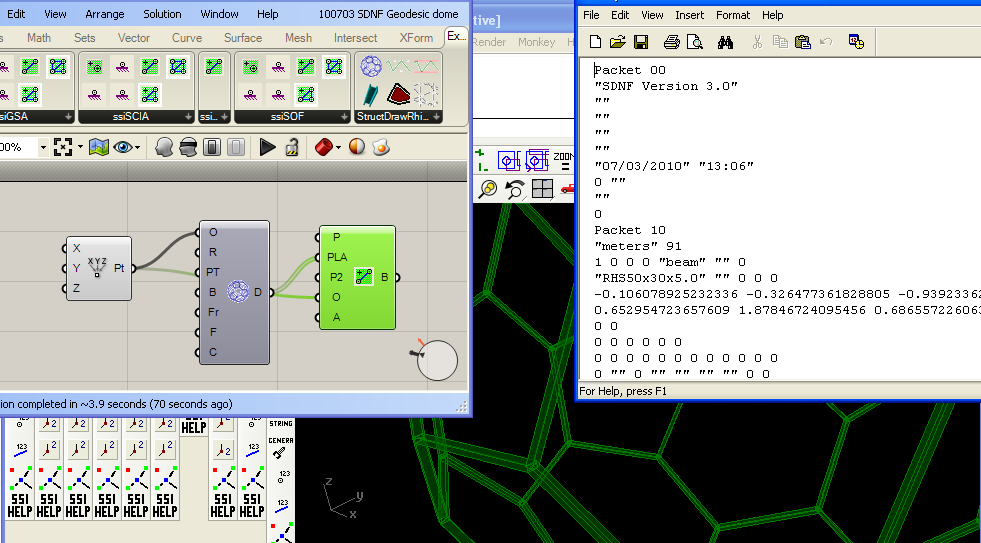
So, to parametrically generate BIM information from parametric modelling software such as Grasshopper is an amazingly powerful tool and workflow.  Already available for use and testing of this workflow is the Geometry Gym SDNF plug-in (available from http://www.geometrygym.com/downloads ), which is capable of skeletal or steel frame model exchange.  I've attached an example geodesic dome model for interested users to test and try this work flow.  Soon to follow will be IFC (Industry Foundation Class) attribute generation which will allow further information such as walls, slabs, doors, windows etc, and hopefully it goes a long way further than that.

Make sure you also download the StructDrawRhino plug-in for the Geodesic component, and you will need the free trial license to activate these Grasshopper components (follow the prompts).

Here's the Grasshopper definition and Rhino model with the SDNF property table saved in it: Rhino Model Grasshopper Definition
You can vary the inputs of the geodesic dome if you wish, and you can parametrically modify the beam profile using the property table accessible from the second button on the SDNF toolbar (use the spanner button to update the profile with that selected in the pull down menus).  When happy, bake the Steel Beams into the Rhino document to activate them (they are virtual whilst in preview mode) in the SDNF database.  If you alter the grasshopper definition and re-bake, the plug-in will try to detect the previous baked elements and delete/replace them.

If you click on the Export SDNF button, you are prompted to generate SDNF ver2 file (I believe Digital Project uses this format) or SDNF ver3 by default.  Then try importing the files into SDNF accepting software.

Note, there are issues to do with different software librarys labelling profiles with different formats, and you can try altering the catalogue definition.  It's possible a means of a mapping table facility may need to be provided in the near future.  If you can give feedback on what does work and what doesn't, I'm most grateful.

Some more examples coming soon, Here's my exports if you wish to try the generated files without the plug-in:

SDNF ver 2    SDNF ver 3

Sunday, 27 June 2010

ssiRhinoIFC Progress - Industry Foundation Class 2x3 - Import and Export

The first public alpha for ssiRhinoIFC is available for downloading at http://www.geometrygym.com/downloads  This allows importing, and some introductory exporting of IFC (Industry Foundation Class) version 2x3 for buildings and structure.

Whilst I'm the first to acknowledge there's a lot of work to be done to cover this comprehensive neutral BIM format, the basis of a very useful tool is already evident.  Working in a consultancy design office, we were often sent primitive DXF/DWG mesh models from steel detailers using software such as Tekla.  More intelligent models such as IFC will provide greater advantages for coordination and checking.

And IFC should also provide a very useful means of import/export to programs such as REVIT. An automated workflow from Grasshopper generation to external BIM software will reduce replicating work and coordination.

Development priority will be given to problems, suggestions, observations and ideas raised by users, so please download the plug-in, get the trial license and start exchanging IFC data with your other programs.

Start your testing by importing some of the example models I've been using, http://bimwiki.com/@api/deki/files/79/=NIST_IFC_Sample.zip and http://bimwiki.com/@api/deki/files/80/=Sample_IFC_files.zip contain a few model files to test.


And see if the IFC file exported from this Rhino model is compatible with IFC viewers and modifying software you use.  You need StructDrawRhino installed, use the command ssiIFCExport and select the beam centrelines.  You can move the locaction of the curves, apply different properties in the SDR property table etc.

A lot more to come on this in the near future, stay tuned....

Friday, 4 June 2010

David Rutten & Friends (AA London Lecture)

In front of a packed house, David Rutten, Daniel Piker and myself presented our recent work and developments for generative modelling utilizing Grasshopper3d.


You can view the presentation online at http://www.aaschool.ac.uk/VIDEO/lecture.php?ID=1212

David presented on his latest feature of Grasshopper, Galapagos (a genetic algorithm based solver).  It's fantastic how David can provide such an amazing user interface to the powerful tools he programs (When I was assisting Fred with the Genetic Algorithm solver for Naples, we had no time to program this visual feedback).

Daniel's work with Physics expressed in Kangaroo is amazing, and very popular.  It's going to be very exciting to see how designers utilize this into their design process.

And I presented on the Geometry Gym plug-ins featuring computation geometric design, and the existing and soon to be released BIM aspects of my tools.  It is becoming more and more apparent that if we have the power to generate many options rapidly, we need to ensure our evaluation tools (Such as structural analysis and other consultant design software) needs to be able to generated and evaluated quickly.  And there are massive benefits to minimizing coordination and duplicated model generation if we can transfer a Grasshopper model into BIM programs such as Tekla or REVIT (amongst many).  The Geometry Gym SDNF,  IFC (Industry Foundation Class) and CIS/2 tools are progressing rapidly.

Sunday, 16 May 2010

Mesh Inflation in Grasshopper (ETFE)


Here's the first effort at a solver to inflate meshes (controlled by pressure) in Grasshopper.

More examples and improvements to come (note the double sided pillow is not enabled yet).

Grasshopper definition : inflateMesh

And a second definition to demonstrate applying restraints and inflating solids or polysurfaces:

Grasshopper definition: boxInflation

Sunday, 2 May 2010

2010 SEI Student Structural Design Competition

Congratulations to Ben Sitler on being awarded 2nd place in the 2010 SEI Student Structural Design Competition.

Ben entered the competition on his own, against teams from around the US.  He found the efficient work flow gained from using the Geometry Gym Rhino plug-ins gave him an advantage against teams.

Ben has been kind enough to permit me to show his Gridshell design for Jadwin Hall.  These images are taken from his Thesis, Sitler, Ben. “Integrated Digital Design to Construction Workflow: from a structural engineer’s perspective.” Thesis, Princeton University, Princeton, NJ, 2010. Print.


Monday, 19 April 2010

Grasshopper Gallery

I thought I'd post some images of some great work being posted on the Grasshopper NING.
Unfortunately most commercial projects are kept in house, but it's nice to see these results in the public domain.

Primarily StructDrawRhino has been used in Grasshopper, in partnership with other plug-ins for some.  If you'd like to have your own work displayed, let me know and I'll add it in.

Wieland Schmidt


Chris E (work in progress)


Ivan Kiryakov (Refer blog post Going Green or Ivan's Gallery)


More to come....

Friday, 16 April 2010

Simply Rhino & AA Grasshopper Presentation Event

Simply Rhino & Architectural Association Grasshopper Presentation Event

David Rutten & Friends
to present Grasshopper
at Architectural Association London

12th May 2010 from 1pm to 3pm

Details here: http://www.simplyrhino.co.uk/about/AA.html

Parametric Structure Models in Grasshopper

The first Geometry Gym plug-in for Grasshopper with Structural model Interaction has just been uploaded.
http:\\www.geometrygym.com/downloads  Versions for GSA, Strand7/Straus7 and Sofistik are available, other modelling interaction will soon follow (ie  SAP, SDNF, Robot etc).  If you want to influence the priority list for release, send me an email with which version you'd like to use.

So, here's a screen capture demonstrating the use of the plug-in, and sending the parametric model out of Rhino into GSA (similar for Strand7, Sofistik and others).


And to try this for yourself, here's the sample models shown and a revisit of the Gherkin.

First Grasshopper Definition to generate structural beams :          GSA Robot SAP2000 Sofistik Strand7


A simplified version of Newcastle Millennium bridge.  I haven't had a chance to add a slider to rotate it yet :-(

Associated Rhino model with properties :  GatesHead Rhino Model
Grasshoppper Definition : GSA Robot SAP2000 Sofistik  Strand7


Revisiting the mini-Gherkin.  Note I'm sure if I get a chance to study Grasshopper Trees and Branches this definition could be simplified a bit.

Associated Rhino model with properties :  Gherkin Rhino Model
Grasshopper Definition : GSA Robot SAP2000 Sofistik Strand7


Saturday, 10 April 2010

Some Green

Ivan Kiryakov has produced some really stunning work with Grasshopper, and it's nice to see him using BullAnt to produce some of these forms and shapes.  I'm referencing some of the photos into this blog entry, but you should check out his album at http://www.grasshopper3d.com/photo/album/show?id=2985220:Album:56274


Genetic Algorithm - Naples Metro Station


http://www.bdonline.co.uk/story.asp?sectioncode=453&storycode=3161354&channel=783&c=2#ixzz0khJ86uns
BdOnline has published an article on a project I was involved with assisting Fred Labbe at Expedition.

The computing power required to calculate the generations of solutions was significant, and the project always attracts debate and interest when presented/discussed with other designers.

You can find a pdf of Fred's presentation in the project info at the right hand of the project page at http://www.expedition.uk.com/index.php?pid=141

Thursday, 25 March 2010

Force Density Relaxing Roofs

Arthur Mamou-Mani posted on the Grasshopper forum (http://www.grasshopper3d.com/forum/topics/tensile-membrane?commentId=2985220:Comment:54158 ) about tensile membranes and Rhino plug-ins that can compute shapes and forms.

I thought the problem looked interesting, and thought I'd see what I could achieve with the new mesh minimal surface tools I've been improving in StructDrawRhino.

You need the latest version of BullAnt (http://www.geometrygym.com/downloads ) and a license file, but you can try this for yourself.
Note, if you altering the inputs such as the control curves, I'd recommend disabling the Grasshopper meshing component temporarily, and then reconnecting it when you want to recompute.

Rhino Model
Grasshopper Definition             

What you find in the basic definition, is that the isolated mesh restraint points produce a very pointed roof, in reality we wish to strength the links along the ridge line.

Here's a revised definition that produces a more desirable result
Strengthened Ridge Line Grasshopper Definition 

Note that the image shows the mesh baked, which helps identify the isocurves or underlying mesh.  Toggling the preview update input can give some insight into how the algorithm is working, at the expense of a slower result.

Sunday, 21 March 2010

Costa Minimal Surface

Force Density (Using the Mesh Vertex Repel command)


Grasshopper Definition     

This definition calls on the ggForceDensity Relax functionality to compute a minimal surface discovered by Costa.  This command doesn't compute minimal surfaces for all mesh, but at least seems to give a reasonable impression for Costa Minimal Surface.

Here's a generic model to also test it.

Grasshopper Definition     

Note, that unless you have a quick computer (or a lot of patience), it's probably worth disconnecting at the Mesh component (or disabling) and previewing the surface if you wish to adjust the sliders for variations.

Arc Poly Curve Extrusion boundary Minimal Surface

Grasshopper Definition

There is also capability to restrain mesh vertex to nominated points, curves and surfaces.  Some examples demonstrating this will be posted soon.

Tuesday, 16 March 2010

Cell Filleting a Curve Network


Files :
Rhino Model  
Grasshopper Model   -  Previous  Grasshopper Model


Files : 

Note that you will need an approved, valid license file for these commands to work.  The BullAnt plug-in can be downloaded from http://www.geometrygym.com/downloads 

If you find any unexpected results in your own models, please let me know and I will review them.

Monday, 8 March 2010

BullAnt GrassHopper Geodesic Dome


This example file demonstrates calling on the BullAnt Geodesic dome function from within Grasshopper, as well as sweeping structural profiles including member orientation. Try for yourself, but you'll need a valid license (or free trial license) file to do so.
Previous Versions

Monday, 22 February 2010

BullAnt utilised in Grasshopper (2012 Main Stadium)

Try for yourself accessing catalogue sections and user defined library of profile curves to be swept parametrically in Grasshopper.

For present, the function is accessed as a c# or vb.net component, and links to a profile section table embedded into a parent Rhino document.  If you update a section profile, you must instruct Grasshopper to recalculate (unless a user modification triggers a recalculation).   There's lot's of planned ideas and improvements to make to this, it's just the beginning (Options for not generating member cap surfaces, root radius fillets etc).  If you have any ideas or suggestions, please let me know and I'll try to implement ASAP.  This includes requests for any specific aspects included in the BullAnt plug-in or SSI model exchanging tools.

Ensure you have downloaded the latest version of the BullAnt plugin from http://www.geometrygym.com/downloads for this to work, and you must have a valid approved license file (free trial) installed on your computer.


Grasshopper Model File:  100406 2012 main stadium.gh 
Rhino Parent Model: 2012 Stadium Rhino Model for GH definition

Monday, 8 February 2010

Cape Town Rhino Users Group Meeting


Simply Rhino SA is hosting another Rhino User Group meeting in Cape Town.  Jon Mirtschin of Geometry Gym Ltd. will present on utilising Rhino3d for geometrical modelling primarily for architecture and structure.  Techniques used to model projects such as the 2012 Olympic Velodrome, Infinity Footbridge and Beijing Watercube will be demonstrated. Innovative tools for geometric modelling including geodesic domes, minimal surfaces, mesh relaxing, tessellation and parametric steel frame modelling will also be featured.


If you are interested in this presentation but unable to attend at this time, or are located in another part of South Africa, please contact Jon at jonm@geometrygym.com to discuss the possibility of meeting.


Monday, 4 January 2010

Structure Analysis Model from Curves


Try for yourself the routines to generate structure analysis model from curves and points in Rhino.
Rhino Model from here.

Tessellation Work in Progress


More on this coming soon...
A demonstration of the work in progress for the tessellation commands in the Rhino3d plug-in.  Note I have edited out some pauses waiting for computation to complete.  The more computing power you have, the better this will perform so please be patient.  Rhino v5 recommended.  More performance improvements coming soon and more tessellations.


Thursday, 24 December 2009

BullAnt Contouring Colors


This screen capture quickly demonstrates the BullAnt command ggContour to apply a spectrum color range to subLayers of active layer. By typing the command, you can nominate to apply it to Rhino objects in a model (based on sequence of creation/modification or selection depending on how you pick the objects). Download the plug-in from http://www.geometrygym.com

Wednesday, 23 December 2009

Orienting Structure to Rhino Surfaces

Here's an example/tutorial for you to follow to use the plug-in to calculate member orientation angles based on the defining surface normal or nearest point.


To try this yourself, here is the Rhino file: Rhino Ellipse


Now the same basic procedure will work presently with 3 analysis packages, GSA, Sofistik (shown) and SAP2000. Strand7 and others coming shortly.
Here's the analysis models:
GSA
Sofistik (Note LOCA 0 is assumed for the moment.)
SAP2000

More instructions coming soon....

Monday, 21 December 2009

Controlling GSA from a Rhino Plug-in

There's been a few requests for help with controlling Ansys from Grasshopper or Rhino on the Rhino newsgroup or Grasshopper forum lately, and in my discussions with them, it's generally been agreed that for a skeletal frame, it's likely to be easier and quicker to use a frame analysis program like GSA to do the exercise. (Possibly influenced by my limited experience with Ansys, which is an amazingly capable but complex analysis program).

GSA have a free version for any academics or students, refer http://www.oasys-software.com/information/universities/educational_licences.shtml

And to assist with getting started, I created a small Rhino Plug-in project that generates a GSA model from scratch and runs an analysis.

Download source code : rhinoControlGSA.zip

If you have GSA running, you can supervise and interact with the program after execution. If GSA is not running, it will run as a background process.

If you're looking for the GWA data on the rhino model objects created using the SSI tools, try using the command GetUserText (or the user string attributes in the Rhino SDK). I'll improve the event watcher shortly so that GWA node coordinates are updated when a node is moved.

This is just the start of interaction with Rhino, there's another level of using the Plug-in code as a library. Feel free to get in touch if you wish to learn more.

Tuesday, 1 December 2009

Weaire-Phelan intersecting a surface


I responded to a request for help on the Grasshopper forum with regards to generating Weire-Phelan polygons intersecting with a surface. I've recorded the screen capture below showing the difference as you halve the size of the polygons which I think is quite interesting. If you wish to try for yourself, the Rhino file can also be downloaded below, could be interesting to see how other shapes look (and to generate the intersecting curves using the command in the BullAnt plug-in)


Associated Rhino File

Sunday, 1 November 2009

British Museum Great Court Roof using StructDrawRhino

Another stunning, innovative structure that has inspired similar projects since.  It's a favorite space of mine, especially on a bright sunny day when the shadows and reflections are mesmerising.


Here's some papers, blog posts and links I found to determine how Happolds and Fosters designed this amazing roof.

http://opus.bath.ac.uk/14111/1/ChrisDeakin2001.pdf
http://www.enhsa.net/downloads/publi/con2004/102_Williams.pdf
http://people.bath.ac.uk/abscjkw/

So, now you can try to do something similar yourself using the structural plug-ins for Rhino.  My routines and commands don't follow exactly the description from the paper, but they allow something similar to be created.


To try this for yourself, the input Rhino file can be downloaded from here

I'm currently coding up algorithms for more powerful force density routines to include dynamic relaxation, but in the interim you can try the sdrMeshRepelVertex command to relax a rigid mesh outline with discontinuitys at nodes/vertices for continuing edges.  I used the sdrZigZagCurves command to divide the initial radial lines to generate the starting Grid.

From the starting flat grid, we can use the plug-in command sdrMeshProjectVerts to project the mesh vertices onto the mathematical surface.

Then we start the mesh relaxing process.  The command  sdrMeshRepelVerts uses force density to repel mesh vertex away from their neighbours.  Naked/Free edges/vertex will be restrained.  The more loops or iterations you allow, the better the result you will get.  Note that you can nominate a target surface that will vertically project the vertex back onto the surface (if you don't, the mesh will naturally flatten).  I found the best result was by nominating the balance force option for a number of iterations, and then to run a few loops of the target equal length for edges.

You can then extract the medge edges to curves using the sdrMeshDupEdges command.  By applying a structural profile (I assumed a much larger hollow profile than that used), the plug-in will automatically sweep the centreline curves.


There is also a number of routines in development for form finding and finding minimal surfaces.  Blog posts with worked examples will shortly follow, but if you look at sdrMinShapeMesh function you can try it for your self.  The other sdrMesh.... routines allow manipulation of mesh generated in Rhino to transform it to arrangements more appropriate for analysis/solving.

If you've any requests, ideas or suggestions for these routines (or need more help or other examples), don't hesitate to get in touch.