Showing posts with label Profile. Show all posts

Wednesday, 30 November 2011

Nurbs To Structural Analysis Profile

At the request of the user, I've advanced the routines to convert arbitrary profiles (including nurbs perimeters) into the structural analysis section profiles capable of approximating this shape.

I've started with GSA, and will look into the other software equivalents shortly.  In GSA the perimeter is defined as a polyline (I have enabled an input to define acceptable deviation from original curve), and properties such as area and inertia are computed from the polyline bounds.


The torsion property is not calculated, so I also enabled a section property modifier component to allow user specification of this value (as well as the others).  There is a means to compute the torsional stiffness using soap film (which was the original reason I started coding mesh inflation), and I'll try to test this approach soon.  If you have any papers or technical explanations/demonstrations of this technique, it can only help accelerate this if you can share it.  Grasshopper definition can be accessed from here.

Monday, 8 March 2010

BullAnt GrassHopper Geodesic Dome


This example file demonstrates calling on the BullAnt Geodesic dome function from within Grasshopper, as well as sweeping structural profiles including member orientation. Try for yourself, but you'll need a valid license (or free trial license) file to do so.
Previous Versions

Thursday, 1 October 2009

Extruding along Rhino Curves


A question raised on the Grasshopper forum for examples/instructions for extruding structural profiles along grasshopper curves prompted me to post a screen capture to you-tube demonstrating the capabilities of the Structural Drawing plug-in.

I thought I'd post the hypar grasshopper file here for those wishing to test it for themselves.

Note that it demonstrates how properties can now be assigned to layers, and that any curve added or modified on that layer will have an updated sweep. For some reason the event watcher doesn't presently identify when the grasshopper bake command finishes, hopefully I'll have this resolved soon.

Monday, 17 August 2009

User Defined Profile Libraries

I've just uploaded a new version of the Structural Drawing Plug-in with plenty of improvements. I'm preparing to post a detailed tutorial showing how these new tools could be implemented to model the Beijing Water Cube, so watch this space.

The plug-in can now use profile libraries defined by the user. These are simply created by creating (or copying) rhino files into the plug-in sub-folder at C:\Documents and Settings\USER\Application Data\GeometryGym\UserProfiles\ or C:\Users\USER\Application Data\GeometryGym\UserProfiles\  (Note folder may be hidden, and is now reported on the Manage Tab of the main StructDrawRhino dialog). There's an example file there showing some numbers and letters as example profiles (you'll find them now listed in the selection drop down boxes). You can create as many collections of profiles as you like, and they will be grouped by filename (First Selection Box), layer name (Second Selection Box) and object name (Third selection box). The profiles must be located in the model YZ plane, and the origin is used as the default insertion point. A curve can be used to define a simple singular profile, or if it has voids, add it as a planar surface.


The files should allow easily to share and collate your profiles, let me know if you have any suggestions for improvements. Note that if you later rename either the file, layer or object, it will have to be reassigned. Another quick tip, the profiles are now assigned by dragging the first button over your model view (instead of clicking the button as per the previous release).

Wednesday, 29 July 2009

Generating Structure in Rhino

Here's the first public version and demonstration applying structure to curves in Rhino using the Rhino BullAnt plug-in. More to follow shortly.


Movie file for those without access to YouTube: AVI File

And here's the files to try yourself.
Note that hollow sections won't be hollow if centreline isn't straight (for the moment), and element orientation will be incorporated soon.

Mini-Gherkin Grasshopper Rhino File for Mini-Gherkin

Saturday, 28 February 2009

Geometry Gym-BullAnt

BullAnt is a plug-in that will be useful for CAD modellers, architects, engineers, and anyone developing Rhino models for construction projects that containing structural elements and representation.  The plug-in contains a library of catalogue sections, particularly hot-rolled and cold-formed steel sections available around the world.  This catalogue is still being developed so please forward any requests and suggestions through to me.

Here's some instructions to help with using the plug-in.

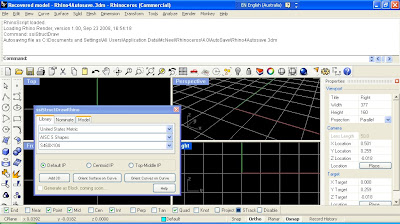
Once the installer has been downloaded and run on your computer, start Rhino and run the command ggStructDraw.  This will bring up the catalogue dialog (shown in the screen capture below) if it is not already visible.  This dialog can be docked in position, or float on your screen whereever is acceptable.

The radio buttons allow the user to specify the insertion point for the section, which will adjust how the section shape will relate to the points the user specified points when adding the structural shapes.  The default IP will generally match be the section centroid, except for asymetric shapes such as channels.  Top-Middle will orient the section shape below the insertion points.


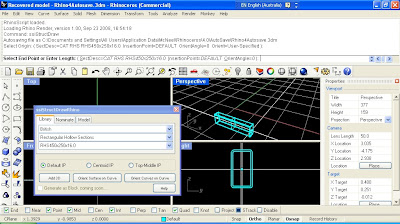
We will look at adding straight extruded sections initially.  By clicking on the Add 3D button, the plug-in command ggStructDrawElement is run.  The user can now select the first point defining the straight line along which the section will be extruded.


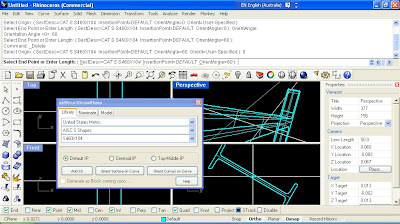
After selecting the first insertion point, the user is prompted for a second.  The length of the extrusion may be specifed by tpying in the number, and then the second selection point will specify the direction. Before specifying the end point of the extrusion, the user can specify if they wish to specify the section direction point, and the orientation angle in plane for the cross section to be rotated (in degrees).  By hitting ENTER when the command completes, it will be repeated.  If your desired section shape is replaced (at random) with the SSI logo, you either need to rerun the command, or request a free trial license for the plug-in by running the command  ggZZLicenseRequest .


Note in the plug-in dialog box, a Nominate tab is available as an alternative for the pull-down menus of the libary catalogue.  A description of the section shape can be entered as a string, in a format consistent with that adopted in Oasys GSA.  GSA contains a wizard for creating these shapes, here's an example : STD CH(m) 0.5 0.3 2.E-002 4.E-002  .  If you don't have GSA (a trial version can be downloaded), the online help describing this is here.

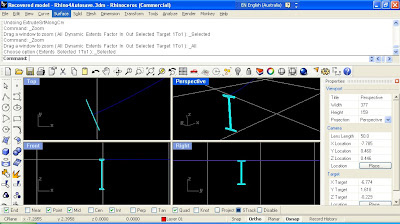
The plug-in also allows users to add a single face surface, or a perimeter curve of the section shape to the rhino document.  The command ggStructDrawSect will be executed from the other two buttons on the dialog, which will prompt the user to select an existing curve to orient the section shape on, and then for a point on that curve.  For this example I have sketched a free form curve, and have oriented a I shape on the start of the curve.

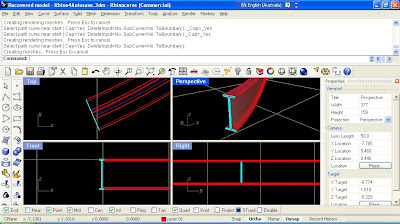
Once the section has been added to the document, it can be used as input to other Rhino commands.  For this example, I've extruded the surface along the curve by using the command ExtrudeSrfAlongCrv .  The images below show the solid resulting from this operation.

All suggestions for improvements for this plug-in gratefully received.  Current thoughts include allowing section specification consistent with other engineering programs, adding more sections (including other countries), and automating process such as section extrusion one existing curve.  Please let me know any other ideas and suggestions.